7 Best AI Assistants for Google Tasks in 2026
Google Tasks is the to-do list most people already have and almost nobody uses properly. It sits in the Gmail sidebar, it syncs everywhere, and it is deliberately featureless. The friction is not the interface. It is that the task always originates somewhere else: an email you have not answered, a meeting where you agreed to something, a message that ends “can you send that over.”
An AI assistant is useful here only if it can read that other place and write the task without you.
We tested seven against Google Tasks and ranked them by how much of that trip they make.
TL;DR: Carly is the pick. It reads your mail and calendar and puts real tasks into Google Tasks, by email or text, with no workflow to build. Gemini can add a task from inside Google. ChatGPT and Claude can reach Tasks once connected, and each holds one account.
1. Carly
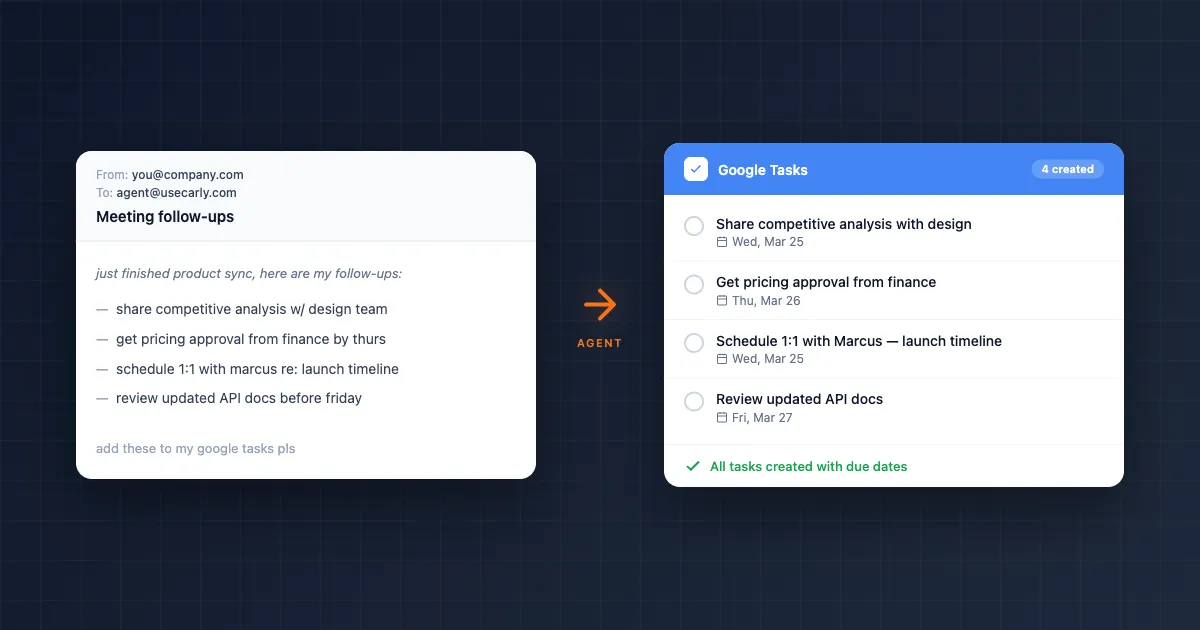
Carly is an AI agent with its own real email address, connected to Google Tasks, Gmail, and Google Calendar. Forward it a thread and the commitment inside it becomes a task with a due date. Text it “what am I on the hook for this week” and it answers from the list. Say “mark the invoice one done” and it is done.
Why it wins: it is the only assistant here that closes the loop without you opening anything. It reads the email that created the obligation, writes the task in words you will understand next Tuesday, sets a due date that matches what you actually promised, and completes items when you say so in passing. Because the same agent holds the calendar, it will also tell you the week is already full. See how to connect Google Tasks to an AI agent.
Pricing: Free Zapier-style workflows; AI agents from $35/month
2. Gemini in Google Workspace
Gemini lives inside Gmail and Google Calendar and can create a task from what you are reading. For someone already in Workspace it is the shortest path from message to to-do.
Where it stops: it works when you are there, in the message, asking. It does not run on a trigger overnight, and it stays inside one Google account, so a second work address is a separate session.
Pricing: Included with several Workspace tiers
3. ChatGPT
With a connector attached, ChatGPT can read and write Google Tasks, and it is a genuinely good drafter of what a task should say.
Where it stops: one account per connection, and you have to be in the chat for anything to happen. It has scheduled tasks, and they run inside ChatGPT rather than reacting to an email landing in your inbox.
Pricing: From ~$20/month
4. Claude
Claude reaches Google Tasks through a connector and is the strongest of the chat assistants at reasoning about what a messy thread actually commits you to.
Where it stops: same shape as ChatGPT. One account, and it acts when you ask.
Pricing: From ~$20/month
5. Zapier
Zapier can create Google Tasks from a trigger in almost any app, and its AI steps can shape the task text.
Where it stops: it is not an assistant, it is plumbing you build and maintain. A Zap that makes a task from a starred email makes one from every starred email. See Zapier alternatives.
Pricing: Free plan; paid from ~$19.99/month
6. Todoist with its AI features
Not Google Tasks, and worth naming because most people asking this question end up considering the switch. Todoist has natural-language capture, filters, and AI assistance, and it is a far richer list than Google Tasks.
Where it stops: it is a migration, and Google Tasks is where your Gmail sidebar and your Calendar already point. See Google Tasks vs Todoist.
Pricing: Free plan; paid from ~$4/month
7. Google Apps Script
For developers, Apps Script can call the Tasks API on a schedule or trigger and do exactly what you specify, for free.
Where it stops: you are writing and maintaining a program, and there is no AI in it unless you add one.
Pricing: Free (your build time)
Quick comparison
| Assistant | Creates tasks from email | Runs unattended | Several accounts | Price |
|---|---|---|---|---|
| Carly | Yes | Yes | Yes | From $35/mo |
| Gemini | Yes, when you ask | No | One | Included in Workspace tiers |
| ChatGPT | Yes, when you ask | Partly | One per connection | ~$20/mo |
| Claude | Yes, when you ask | No | One per connection | ~$20/mo |
| Zapier | Yes, on a fixed trigger | Yes | Yes | Free; from ~$19.99/mo |
| Todoist | In Todoist, not Tasks | Partly | Yes | Free; from ~$4/mo |
| Apps Script | Only if you build it | Yes | Yes | Free (DIY) |
FAQ
What is the best AI assistant for Google Tasks? Carly, because it reads the email or meeting that created the task and writes it into Google Tasks without you opening anything, then completes items when you tell it to in passing.
Can Gemini add things to Google Tasks? Yes, from inside Gmail and Calendar, while you are there asking. It will not sit on the inbox and capture commitments on its own.
Can ChatGPT or Claude manage Google Tasks? Both can once a connector is attached. The Google Tasks connection holds a single account on each of them, and both act only when prompted in the chat.
More: How to connect Google Tasks to an AI agent · Best AI automation tools for Google Tasks · Google Tasks vs Todoist
Ready to automate your busywork?
Carly schedules, researches, and briefs you—so you can focus on what matters.
See what people say
"Before Carly, I relied on a Calendly link, but the whole process felt impersonal and not very professional. Carly changed that by handling all the back-and-forth, so I'm no longer stuck in endless email threads trying to line up schedules.
Now Carly reaches out to candidates, shares my real-time availability, lets them pick a slot, then sends a Zoom link and drops it straight into my calendar. She sends reminders to both of us before each call, which has significantly reduced no-shows and last-minute confusion.
On top of scheduling, Carly acts like a full executive assistant, sending me my schedule the night before so I can prepare for each call. It reminds me of the old x.ai assistant, but Carly is noticeably smarter, faster, and better suited to my healthcare recruitment business."