How to Set a Default Country Code on a Carly Form
To set the default country code on a Carly form, edit the form, find the phone question and choose a country under Default country. Then save. Visitors see that country’s dialling code when the form opens, for example GB +44, and can still choose another country.
Open a phone question on UK +44
- Open Forms in Carly and click Edit on your form.
- Find the phone question, such as Contact Number.
- Under Default country, choose United Kingdom (+44).
- Check the preview on the right. The question shows GB +44 with a UK example number.
- Click Save changes.
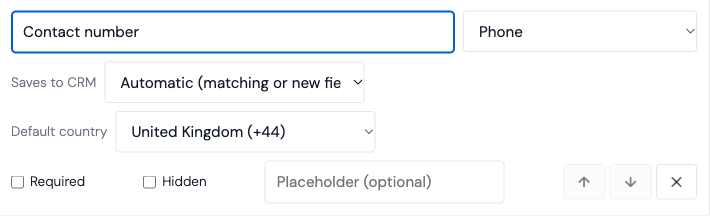
Screenshot from the actual Carly application using a test account.
Each phone question has its own setting, so a form can ask for a UK mobile number and a US office number.
What visitors see
The form opens on the country you chose, with that country’s example number in the box:
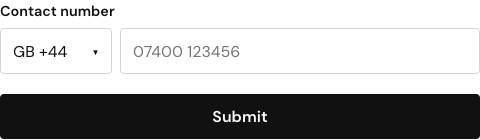
Visitors can type their number the way they’d normally write it, such as 07400 123456. Carly saves it in international format, +447400123456, so a workflow or a call from your agent reaches the right country.
Visitors can still pick another country from the list. If they type or paste a number that starts with +, the country switches to match it.
Embedded forms load the same page, so the change applies to your website embed too.
Ask Carly to change it
You can ask:
On my Expression of Interest form, set the Contact Number question’s default country to United Kingdom.
Name the form and the question so Carly changes the right one.
Troubleshooting
What country does a new phone question start on?
Your account’s country. If Carly doesn’t know your country, the question starts on the United States. Choose Default country to change it.
Why do visitors still see US +1?
The change only takes effect after you click Save changes. Reload the form’s link afterwards to check.
Does this change responses I already have?
No. It only changes which country the question opens on. Saved responses stay as they were.
Why is there no Default country option on my question?
The option only appears on visible phone questions. A hidden question is filled in from the form’s link, so visitors never see a country list.
Last verified: November 12, 2026.
Ready to automate your busywork?
Carly schedules, researches, and briefs you—so you can focus on what matters.
See what people say
"Before Carly, I relied on a Calendly link, but the whole process felt impersonal and not very professional. Carly changed that by handling all the back-and-forth, so I'm no longer stuck in endless email threads trying to line up schedules.
Now Carly reaches out to candidates, shares my real-time availability, lets them pick a slot, then sends a Zoom link and drops it straight into my calendar. She sends reminders to both of us before each call, which has significantly reduced no-shows and last-minute confusion.
On top of scheduling, Carly acts like a full executive assistant, sending me my schedule the night before so I can prepare for each call. It reminds me of the old x.ai assistant, but Carly is noticeably smarter, faster, and better suited to my healthcare recruitment business."