
How to Let Your Carly Agent Book on Your Booking Page
Open the agent, click Tools, turn on Booking, then click Choose booking pages and pick your page. From then on the agent books only times the page allows: its hours, date overrides, minimum notice, end date, and the calendars it checks for conflicts.
Choose the page for an agent
- Open Agents in Carly and select the agent.
- Click Tools and turn on Booking.
- Under Booking, click Choose booking pages.
- Select one page, several, or All pages, which also covers pages you make later.
- Click Use this page (or Use these pages). The change saves on its own.
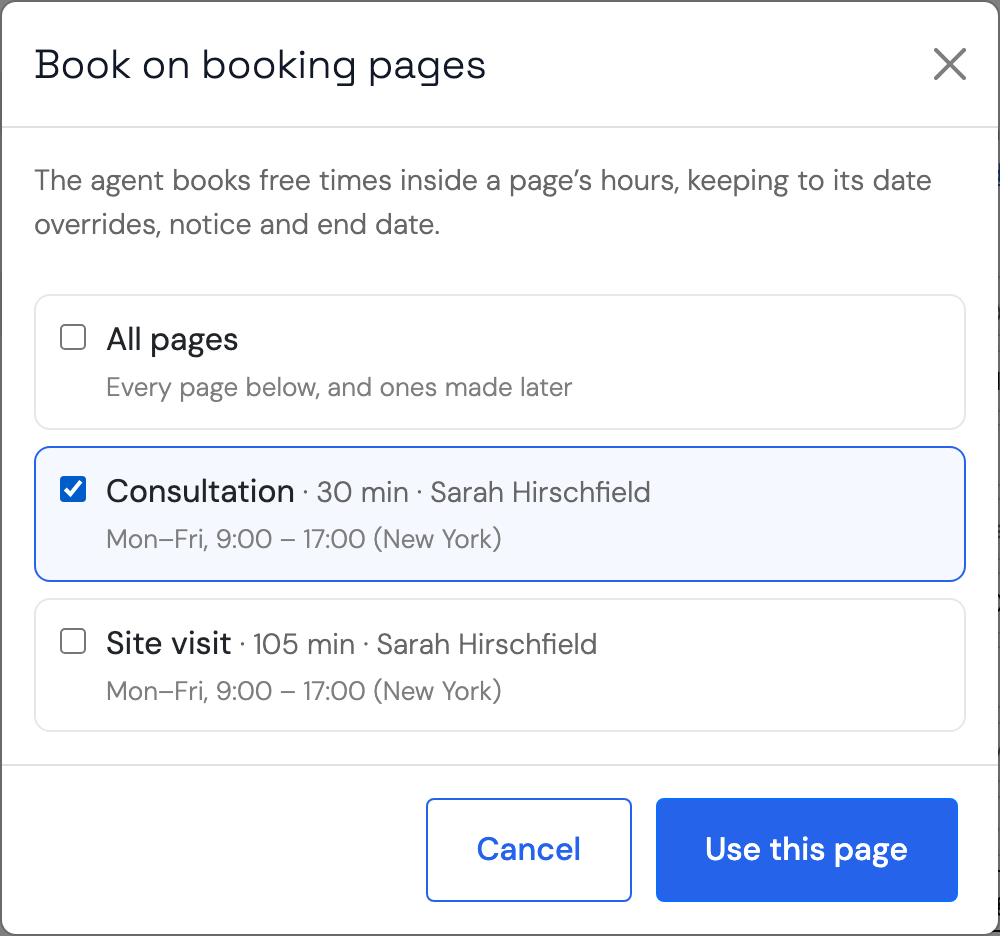
This works the same for texting, WhatsApp, email and phone agents. A team’s agent can use the team’s pages and its members’ pages; your own agent uses your own pages. With several pages, the agent books on the one that fits what the person asks for, and asks which they mean when it isn’t clear.
To go back to booking on calendars with one set of hours, click Use calendars and hours instead.
You can also start from the page. On a team, open Agents → Calendars. The Booking pages section lists each page and the agents booking on it. Click Assign an agent (or Add when a page already has one), tick the agents, and click Assign; Booking turns on for them.
Or ask Carly: “Have my texting agent book appointments on my Consultation booking page.”
The page enforces its own rules
Every booking goes through the booking page, the same way a booking from your link does. It is not left to the agent’s instructions. The page checks:
- its weekly hours, date overrides, minimum notice, how far ahead people can book, and its end date
- the calendars it checks for conflicts, and bookings already on the page
- on a round-robin page, which host is free
If a time breaks any of these, the booking is refused and the agent offers another time. The agent can offer any free time inside the page’s hours, not only the start times your page lists: 1:05 on a page that lists 1:00 and 1:20, for example.
A booking the agent makes sends the page’s confirmation email and calendar invite and shows in the page’s bookings, like any other.
Moving and cancelling
The agent can move or cancel a person’s booking on the page, including one they made from your link. It moves the existing booking instead of making a second one. If the page doesn’t let guests cancel, the agent leaves cancelling to you.
When someone asks about their appointments, the agent checks your calendar, so a meeting you moved or deleted there shows as moved or gone.
The page’s questions
If your page asks questions, the agent doesn’t ask them by default, since that can make a quick booking feel long. To have it ask, tick Ask the pages’ questions before booking under Booking. It still books if the person skips one.
Testing
On the agent’s Test tab, nothing is sent or booked. The agent reads real open times from the page and shows the booking it would have made. Test calls write nothing to your calendar or CRM either.
Troubleshooting
Why don’t I see my page in the list?
The list shows active pages that anyone can book. A paused page, or one that needs a private link, isn’t listed. On a team, a member’s page is listed while they’re an active member.
The agent offered a time outside my hours
Check that the agent is set to your booking page under Tools → Booking, not calendars and hours. If it is, the page refuses the time when the agent tries to book it.
Why did the booking come back as a request?
Your page needs your approval for new bookings. The agent tells the person it isn’t booked until you confirm it, and you confirm it as you would any request.
Last verified: November 16, 2026.
Ready to automate your busywork?
Carly schedules, researches, and briefs you—so you can focus on what matters.
See what people say
"Before Carly, I relied on a Calendly link, but the whole process felt impersonal and not very professional. Carly changed that by handling all the back-and-forth, so I'm no longer stuck in endless email threads trying to line up schedules.
Now Carly reaches out to candidates, shares my real-time availability, lets them pick a slot, then sends a Zoom link and drops it straight into my calendar. She sends reminders to both of us before each call, which has significantly reduced no-shows and last-minute confusion.
On top of scheduling, Carly acts like a full executive assistant, sending me my schedule the night before so I can prepare for each call. It reminds me of the old x.ai assistant, but Carly is noticeably smarter, faster, and better suited to my healthcare recruitment business."