10 Best AI Project Management Tools in 2026 (Ranked by What They Automate)
Almost every project management tool now has “AI” stamped on it. But there are two different things being sold. Most tools add AI to the board — summarize this thread, draft this task, predict this deadline. One approach skips the board entirely and runs the project for you — creating tasks, chasing updates, and moving work across whatever tools you already use.
We tested the field and ranked the 10 that remove the most manual project-management work, not the ones with the most AI buttons. (New to the category? Start with what AI agents are.)
Quick Comparison
| Tool | AI approach | Best for | Starting Price |
|---|---|---|---|
| Carly AI | Agent that runs your existing tools via email | Updating, routing, and chasing work across apps | $35/mo |
| ClickUp | AI-native all-in-one (ClickUp Brain) | Teams wanting everything in one app | Free / $7/user/mo |
| Asana | AI teammates & smart fields | Structured cross-team projects | Free / $10.99/user/mo |
| Monday | monday AI blocks | Visual, customizable workflows | Free / $9/user/mo |
| Notion | Notion AI + projects | Docs-plus-projects in one workspace | Free / $10/user/mo |
| Linear | AI-assisted issue tracking | Product & engineering teams | Free / $8/user/mo |
| Motion | AI auto-scheduling of tasks | Solo & small teams overloaded with tasks | $19/user/mo |
| Wrike | Wrike AI work intelligence | Mid-to-large operations teams | Free / $10/user/mo |
| Height | Autonomous project management | Teams wanting AI to manage the backlog | Free / $6.99/user/mo |
| Jira | Atlassian Intelligence | Software teams in the Atlassian stack | Free / $7.53/user/mo |
1. Carly AI — Best for Running the Project Management Tool You Already Have
Every other tool on this list is the project board. Carly is the agent that operates one — through email, so nobody has to learn a new interface or migrate their projects.
From your Carly dashboard you create an agent, give it instructions, and connect the PM tools you already use from 200+ integrations across 40+ categories: Asana, Monday, ClickUp, Jira, Linear, Trello, Basecamp, Shortcut, and Wrike.
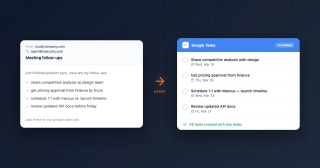
The work it takes off your plate is the administration of projects, which is where the hours actually go. A project agent can turn a meeting’s action items into Asana tasks, chase owners for status updates, post a daily standup summary to Slack, create a Linear issue from a customer email, and keep a Notion doc in sync with the board — all triggered by email or a workflow, not by you clicking through five apps.
Carly is also built on visible workflows, and every step that doesn’t use AI runs free. Moving a card when a deal closes, creating a task from a form, posting an update to a channel — the deterministic project plumbing — runs free; you only pay when a step calls an AI model.
Key capabilities:
- Custom agents with dedicated email addresses
- Connects to Asana, Monday, ClickUp, Jira, Linear, Trello, Basecamp, and more
- Turns emails and meetings into tasks automatically
- Chases status updates and posts standup summaries
- Free non-AI workflow steps
Pricing: Free Zapier-style workflows; AI agents starts at $35/month
Best for: Teams that don’t want to switch project tools — they want the busywork around their current tool handled automatically
Limitations: It’s not a board itself, so you keep your existing PM app. Email-based interaction won’t suit anyone who wants a visual Gantt to click through.
2. ClickUp — Best AI-Native All-in-One
ClickUp Brain is woven through the whole app: it summarizes tasks and threads, drafts updates, answers questions about your workspace, and generates subtasks from a goal. If you want one tool that holds docs, tasks, goals, and dashboards with AI on top of all of it, ClickUp is the most complete.
Key capabilities:
- ClickUp Brain across tasks, docs, and dashboards
- AI-generated subtasks, summaries, and standups
- Huge feature surface — views, automations, goals
- Generous free tier
Pricing: Free tier; Unlimited at $7/user/month
Best for: Teams that want everything in one app with AI everywhere
Limitations: The feature density is a real learning curve. “Everything in one place” can become “everything to configure.”
3. Asana — Best for Structured Cross-Team Projects
Asana’s AI teammates can flag risk, draft status updates, and answer questions about a project’s health, while smart fields auto-organize incoming work. Asana’s strength has always been clean structure across teams, and the AI builds on that rather than reinventing it.
Key capabilities:
- AI teammates for status, risk, and Q&A
- Smart fields and smart summaries
- Strong cross-team project structure
- Mature integrations and reporting
Pricing: Free tier; Starter at $10.99/user/month
Best for: Cross-functional teams running many structured projects
Limitations: The best AI features sit on higher tiers. Can feel heavy for a small team’s simple list.
4. Monday — Best for Visual, Customizable Workflows
monday’s AI blocks let you build automations and summaries into its famously colorful boards. It’s the most approachable of the heavyweight platforms — you can shape a workflow visually, then drop AI steps in to draft, categorize, or summarize.
Key capabilities:
- AI blocks inside customizable boards
- Visual, color-coded workflows
- No-code automations
- Dashboards across projects
Pricing: Free tier; Basic at $9/user/month
Best for: Teams that think visually and want to customize everything
Limitations: Costs climb with seats and features. Customization freedom can lead to inconsistent setups across teams.
5. Notion — Best for Docs and Projects Together
Notion AI sits inside the workspace where many teams already keep their docs, wikis, and lightweight projects. If your project lives next to its documentation, Notion keeps them in one place and lets AI draft, summarize, and query across both.
Key capabilities:
- Notion AI across docs and databases
- Projects, tasks, and wikis in one workspace
- Flexible database views
- AI Q&A over your workspace
Pricing: Free tier; Plus at $10/user/month
Best for: Teams whose projects and documentation belong together
Limitations: Not a dedicated PM tool — lacks the heavy reporting and dependency management of ClickUp or Asana.
6. Linear — Best for Product and Engineering Teams
Linear is the fast, opinionated choice for software teams. Its AI assists with issue triage, drafting, and surfacing related work, all wrapped in an interface built for speed. It does less than the all-in-ones on purpose, and that’s the point.
Key capabilities:
- AI-assisted issue triage and drafting
- Extremely fast, keyboard-driven UI
- Cycles, roadmaps, and projects for product teams
- Clean GitHub/GitLab integration
Pricing: Free tier; Standard at $8/user/month
Best for: Product and engineering teams who value speed and focus
Limitations: Built for software workflows — a poor fit for marketing, ops, or client work.
7. Motion — Best for AI Auto-Scheduling
Motion’s pitch is different: it takes your tasks and automatically schedules them onto your calendar, rebuilding the plan whenever something changes. For people drowning in tasks who can’t decide what to do next, the AI does the prioritizing.
Key capabilities:
- AI auto-schedules tasks onto your calendar
- Re-plans automatically when priorities shift
- Combines tasks, projects, and calendar
- Good for individual overload
Pricing: Starts at $19/user/month
Best for: Solo workers and small teams overwhelmed by task volume
Limitations: Less of a team-collaboration platform. The auto-scheduling can feel rigid if your day is unpredictable.
8. Wrike — Best for Operations Teams
Wrike’s AI work intelligence flags risks, drafts content, and summarizes project activity for larger operations and marketing teams. It’s built for organizations that need approvals, proofing, and detailed reporting at scale.
Key capabilities:
- AI risk prediction and content drafting
- Proofing and approval workflows
- Advanced reporting and resource management
- Enterprise-grade controls
Pricing: Free tier; Team at $10/user/month
Best for: Mid-to-large operations and marketing teams
Limitations: Heavier and pricier as you add the features that justify it. Overkill for small teams.
9. Height — Best for Autonomous Backlog Management
Height leans hardest into “autonomous” project management — its AI can triage the backlog, update tasks, and handle the bookkeeping a project manager usually does manually. It’s a bet on AI managing the board rather than just assisting on it.
Key capabilities:
- Autonomous task triage and updates
- AI that maintains the backlog
- Clean, modern interface
- Affordable per-seat pricing
Pricing: Free tier; paid from $6.99/user/month
Best for: Teams willing to let AI run the day-to-day backlog upkeep
Limitations: Newer and smaller ecosystem than the incumbents. Autonomous features need oversight.
10. Jira — Best for the Atlassian Stack
If your software team already lives in Atlassian, Jira with Atlassian Intelligence is the natural choice. The AI helps write issues, summarize threads, and query work in natural language across Jira and Confluence.
Key capabilities:
- Atlassian Intelligence across Jira and Confluence
- Deep software-development workflows
- Powerful (if complex) configuration
- Tight Confluence and Bitbucket integration
Pricing: Free tier; Standard at $7.53/user/month
Best for: Software teams committed to Atlassian
Limitations: Complexity is legendary. Configuration and administration are a job in themselves.
How to Pick
- Keep your current tool, kill the busywork → Carly
- One AI-native app for everything → ClickUp
- Structured cross-team projects → Asana
- Visual, customizable boards → Monday
- Docs and projects together → Notion
- Product/engineering speed → Linear
- Auto-scheduling your task list → Motion
The platforms compete to be your project board. The faster win for most teams is removing the manual upkeep around the board they already use.
Related guides: Best AI agents for productivity · Best AI workflow automation tools · Best AI marketing agents · Best AI tools for remote work
Ready to automate your busywork?
Carly schedules, researches, and briefs you—so you can focus on what matters.
See what people say
"Before Carly, I relied on a Calendly link, but the whole process felt impersonal and not very professional. Carly changed that by handling all the back-and-forth, so I'm no longer stuck in endless email threads trying to line up schedules.
Now Carly reaches out to candidates, shares my real-time availability, lets them pick a slot, then sends a Zoom link and drops it straight into my calendar. She sends reminders to both of us before each call, which has significantly reduced no-shows and last-minute confusion.
On top of scheduling, Carly acts like a full executive assistant, sending me my schedule the night before so I can prepare for each call. It reminds me of the old x.ai assistant, but Carly is noticeably smarter, faster, and better suited to my healthcare recruitment business."