How to Set Up an AI Email Agent (Step by Step)
An AI email agent is an AI worker that lives at its own email address. Anyone can write to it — your team, your clients, total strangers if you allow it — and it answers and acts on its own, using only the tools and knowledge you’ve granted it. A handbook agent that answers HR policy questions from the actual handbook. A support agent that resolves what it can and CCs a human for the rest. An accounts agent that logs every receipt emailed to it.
That’s a different thing from an AI assistant that manages your inbox — triaging your mail, drafting your replies. If that’s what you’re after, start with CC’ing an assistant on your email or the inbox triage agent build. This guide is about standing up a separate, addressable agent with a job of its own — which takes about five minutes, and can be done entirely by email.
Why the email address is the whole trick
Every business already knows how to use email. Nobody has to install anything, learn a chat app, or get a login to ask an email agent a question — they write to handbook@ or support@ the way they’d write to a coworker. The address is also what makes restriction possible: because the agent is a separate identity rather than a mode of your own account, you can give it exactly the tools, files, and data its job needs and nothing else.
The big chat assistants don’t have an equivalent.
Sending is no longer the dividing line; being present is. ChatGPT and Claude will both put a message in the outbox once you confirm it, and Claude's Microsoft 365 side refuses attachments outright. Neither of them writes the reply that has to go out while you are in a meeting. Carly does that, from all of the accounts you connect.
But none of them can be given an address — there’s no way for a colleague or customer to email ChatGPT and get your company’s answer back. That’s the gap email agents fill. (Our explainer on AI agent email addresses covers the mechanics.)The walkthrough below uses Carly, where email agents are a built-in feature alongside the main assistant.
Step 1: Create the agent — by email or from the dashboard
The fastest way is to email Carly (carly@usecarly.com) and ask:
Or do it from the dashboard: the Email Agents tab, name the agent, pick its inbox, hit Create.
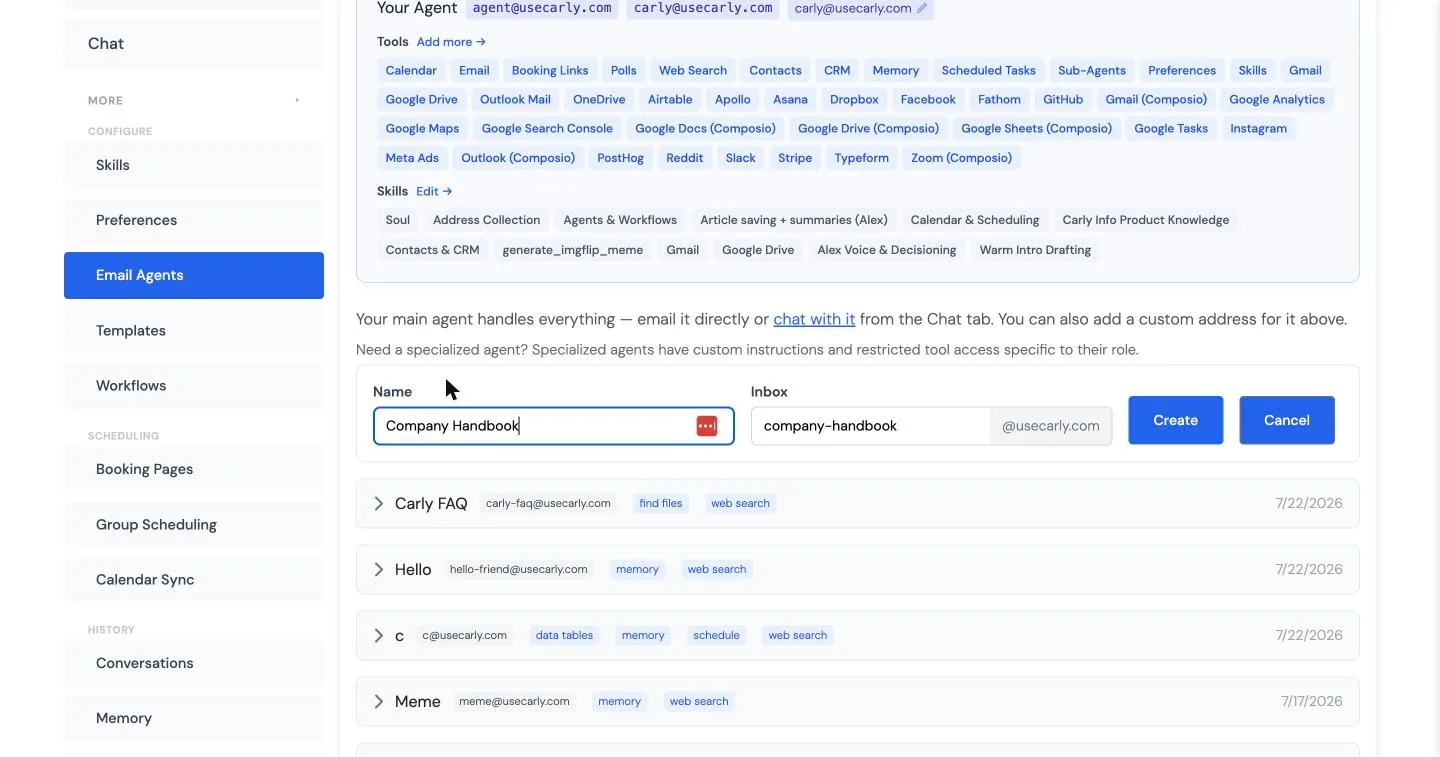
Two fields and it exists. Everything after this is configuration — and the defaults are sane enough that a simple Q&A agent works immediately.
Step 2: Write its instructions and upload its knowledge
Expand the agent to configure it. The Instructions field is the agent’s job description, and the pattern that works is a three-step escalation: answer from your documents first, fall back to an approved public source second, and hand off to a human third. For a product FAQ agent, that reads something like: answer from the common-questions file; if it’s not in there, check our website; if you still can’t answer, CC support@ and a real person takes over.
Under Knowledge, upload the documents the agent should answer from — a handbook, a pricing sheet, policy docs (PDF, Word, CSV, spreadsheets, even images, up to 20 MB each). The agent searches them before answering, which is what keeps its replies grounded in your actual policies instead of plausible-sounding guesses.
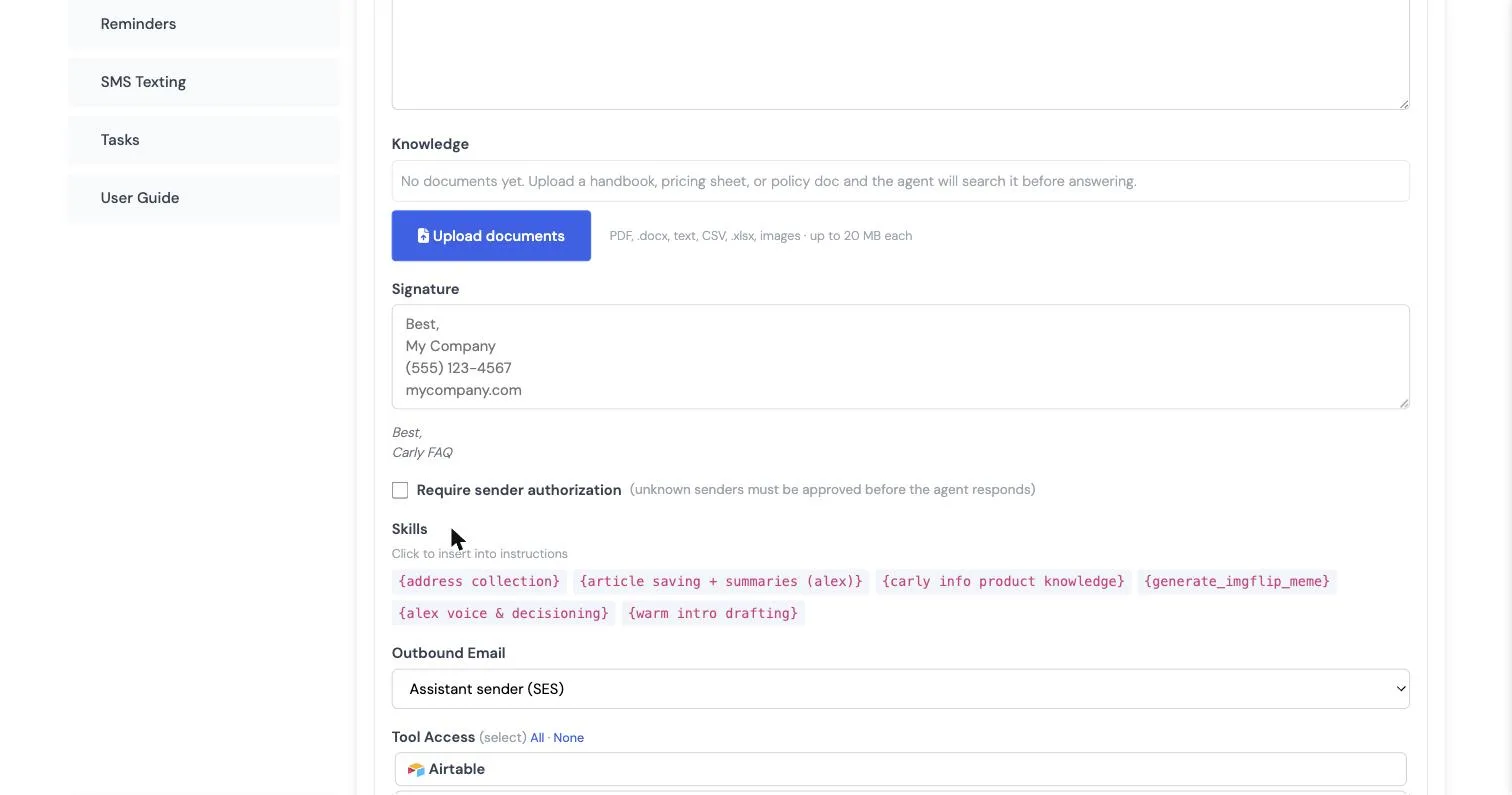
Two settings on this screen deserve attention:
- Signature — the agent signs every email it sends. Sign it honestly (“Best, Company Handbook”) so people know they’re talking to an agent. More on naming in our guide to giving an AI agent a name, email, and personality.
- Require sender authorization — with this on, unknown senders must be approved before the agent responds. Leave it off for an internal handbook agent everyone should be able to use; turn it on for any agent whose address might leak to people you don’t want operating it.
Step 3: Restrict its tools
This is the step that makes email agents safe to point at other people. The Tool Access list shows everything the agent could use — built-ins like web search, memory, data tables, file search, and scheduled tasks, plus every integration on your account — and you select only what the job requires.
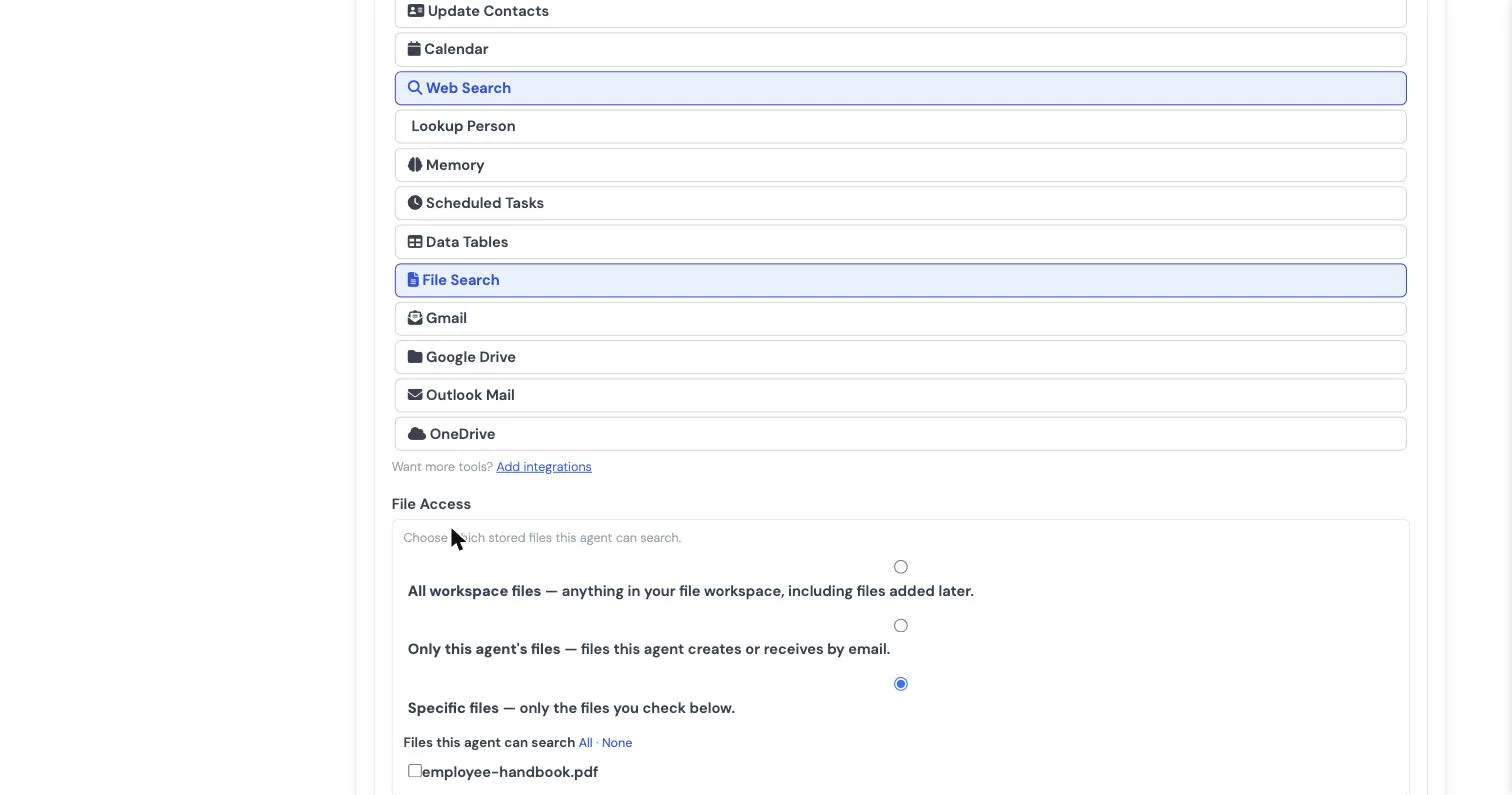
The handbook agent gets memory and file search. Nothing else — it cannot send calendar invites, touch your CRM, or read your mail, because it was never given those tools. File Access works the same way with three scopes: all workspace files, only files the agent itself creates or receives, or a specific checked list.
The useful mindset is default-deny, same as you’d onboard a contractor: grant what the job needs, add more later if the job grows. Two tools deserve a special mention:
- Data Tables gives the agent structured storage it can read and write — an accounts agent logging every emailed receipt into a table, an intake agent building a list of leads.
- File Search is how it answers from your uploaded knowledge.
Step 4: Test it the way a stranger would
Email the agent from a normal account and ask a real question:
The source citation is the tell that it’s answering from your documents. If a reply is wrong or off-tone, correct it by email — the correction sticks.
What a team of email agents looks like
Each agent is one job with one address and its own minimal tool grant, so a small team accumulates naturally:
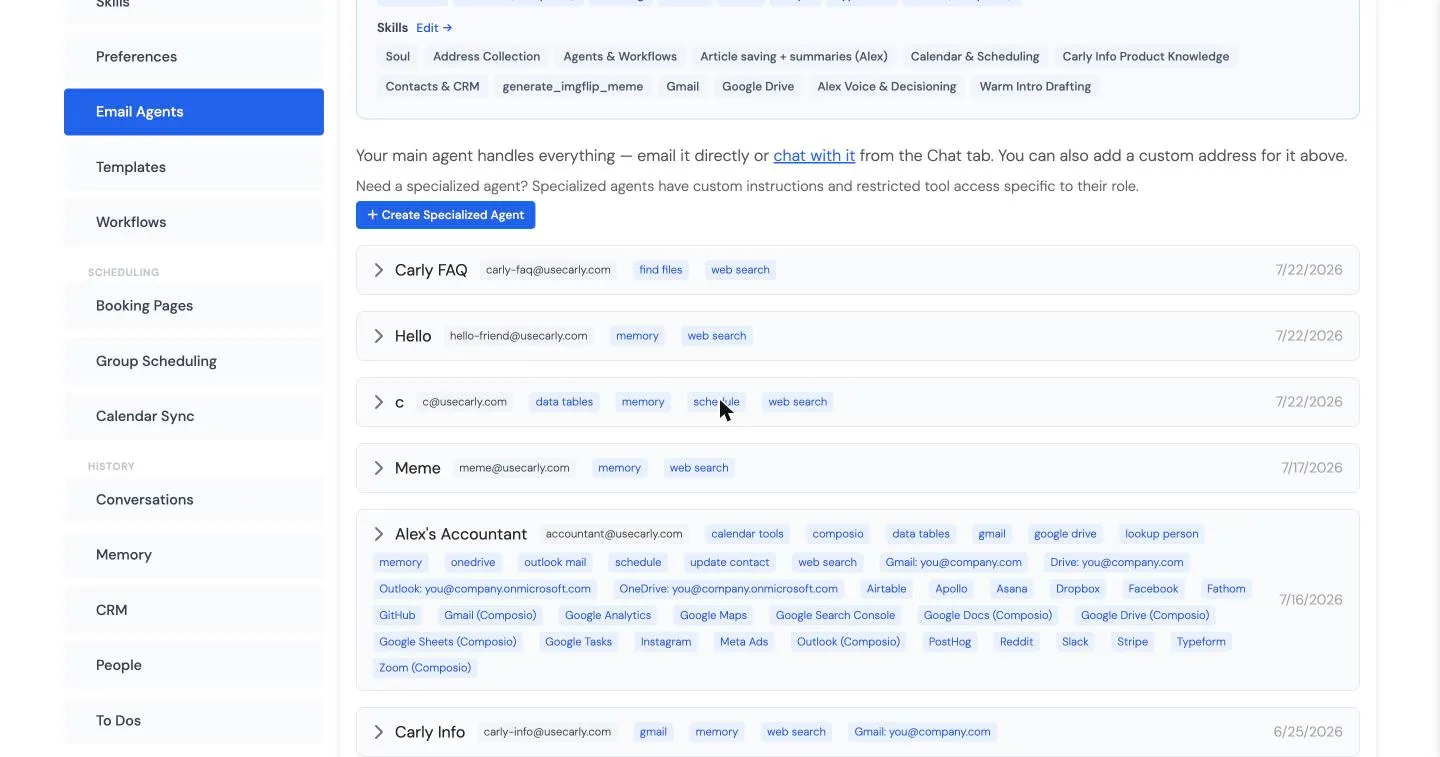
Some builds that map cleanly onto the feature set:
- Handbook / HR policy agent — knowledge docs + file search. Answers the same twenty questions forever, with page citations.
- Support / FAQ agent — knowledge docs + web search, instructions that CC a human when it’s stuck, sender authorization off.
- Accounts agent — data tables + your accounting integration. Everyone forwards receipts and invoices to one address; they come back logged.
- Recruiting intake agent — data tables + calendar tools. Candidates email it, it answers process questions and books screens.
- Website FAQ agent — memory + web search, answering from your public site, for an address you can put on a contact page.
A support agent doesn’t need your accounting tools and a billing agent doesn’t need your applicant pipeline — per-agent scoping is the reason this works as a team rather than one over-privileged bot. For deeper builds with integrations chained together, see the custom AI email agent guide, and for how the vendors compare, the best AI email agents.
FAQ
What is an AI email agent?
An AI email agent is an AI worker with its own email address that reads incoming messages, answers them, and takes action on its own — using a restricted set of tools and knowledge you grant it. Unlike an autoresponder or a writing assistant, it understands each email and does the work: answering policy questions from a handbook, logging receipts, booking interviews.
What’s the difference between an AI email agent and an AI email assistant?
An assistant works on your mailbox — triaging, drafting, replying as you. An email agent is a separate identity with its own address that other people email directly, holding only the tools and knowledge you granted it. Most teams end up with both: an assistant for the owner’s inbox, agents for shared jobs like support and intake.
Can people outside my company email the agent?
Yes — the address works for anyone by default, which is the point for support or intake agents. For agents that shouldn’t be public, turn on sender authorization so unknown senders need your approval before the agent engages.
Can an AI agent have its own email address?
Yes. On Carly, every agent gets a dedicated @usecarly.com address the moment you create it — you pick the inbox name, and the address works immediately for anyone who emails it. That’s what separates a real email agent from a chatbot with an email button: the address is the interface. Our guide to AI agent email addresses covers the details.
Ready to automate your busywork?
Carly schedules, researches, and briefs you—so you can focus on what matters.
See what people say
"Before Carly, I relied on a Calendly link, but the whole process felt impersonal and not very professional. Carly changed that by handling all the back-and-forth, so I'm no longer stuck in endless email threads trying to line up schedules.
Now Carly reaches out to candidates, shares my real-time availability, lets them pick a slot, then sends a Zoom link and drops it straight into my calendar. She sends reminders to both of us before each call, which has significantly reduced no-shows and last-minute confusion.
On top of scheduling, Carly acts like a full executive assistant, sending me my schedule the night before so I can prepare for each call. It reminds me of the old x.ai assistant, but Carly is noticeably smarter, faster, and better suited to my healthcare recruitment business."