What Is an AI Agent? (And How It Differs From Automation)
An AI agent is software that uses a large language model to reason about a goal, decide what to do, take action using tools, check the result, and try again — instead of following a fixed, pre-built set of rules. The key difference from traditional automation is this: automation is rule-based (you tell it exactly what to do, step by step), while an agent is intent-based (you tell it the outcome you want, and it figures out the steps). That shift — from flowchart to reasoning loop — is what people mean by “agentic automation.”
This guide covers what an agent actually is, how it differs from automation tools like Zapier and Make, where each wins, and a concrete email example. For the broader explainer, see our companion post what are AI agents.
What an AI agent actually is
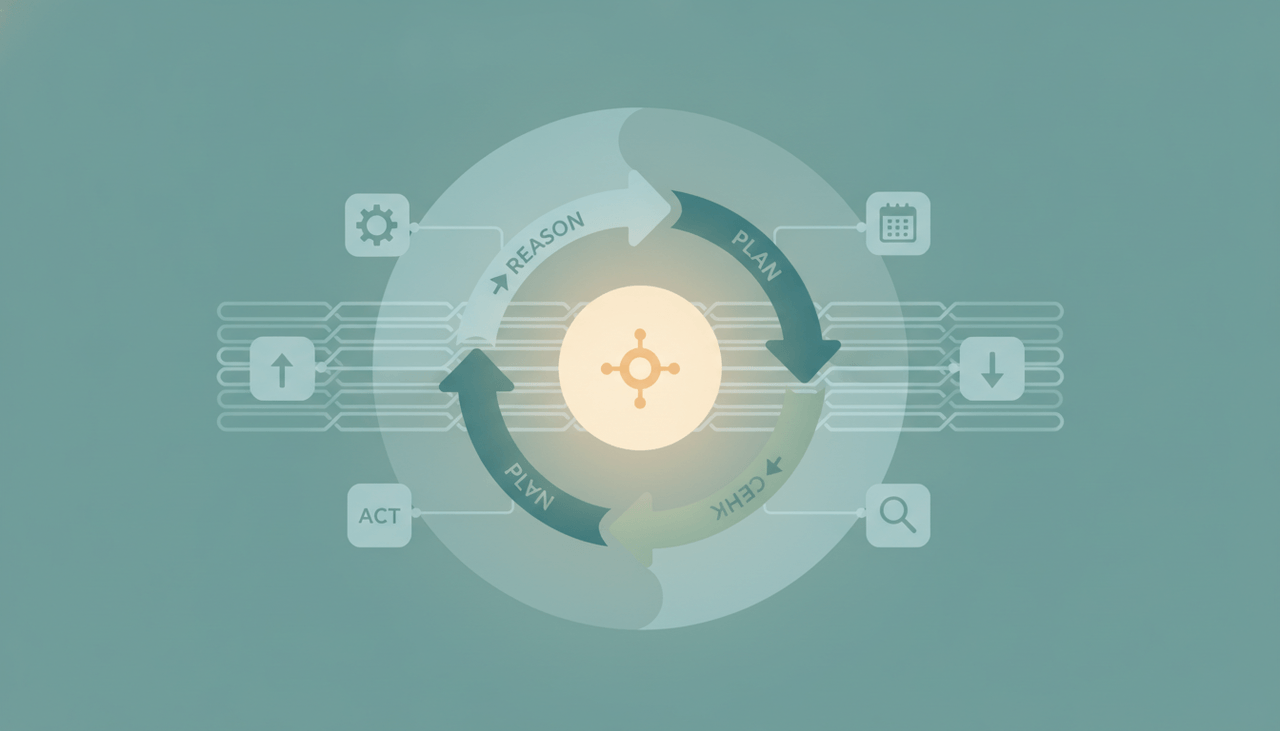
A traditional program does what you wrote. An AI agent does what you want — by running a loop:
- Reason — interpret the goal and the current situation.
- Plan — decide the next step toward the goal.
- Act — use a tool (send an email, query an API, update a record, read a file).
- Observe — look at the result of that action.
- Iterate — adjust and repeat until the goal is met.
Three capabilities make this possible:
- Tool use: the model isn’t just generating text — it can call functions, hit APIs, and operate apps.
- Memory: it can carry context across steps and over time, not just within one prompt.
- The agent loop: it checks its own results and decides what to do next, rather than running a single predetermined path.
That loop is the whole point. A script that breaks the moment input looks different from what you expected is not an agent. An agent that re-reads the situation and adapts is.
AI agent vs automation: rule-based vs intent-based
This is the distinction that trips most people up, so here it is directly.
| Traditional automation | AI agent | |
|---|---|---|
| Model | Rule-based (if this, then that) | Intent-based (reach this goal) |
| You provide | The exact steps | The desired outcome |
| Handles unstructured input | Poorly | Well |
| Adapts when things change | No — breaks or skips | Yes — reasons and adjusts |
| Reliability on fixed tasks | Very high | High, but less deterministic |
| Example | ”When a row is added, send template" | "Handle the inbound leads however makes sense” |
| Tools | Zapier, Make, n8n flows | Carly, Lindy, n8n AI agents |
Traditional workflow automation is a flowchart you draw once: trigger, then a fixed sequence of actions. It’s brilliant when the steps never change. An AI agent is a worker you brief: it interprets the situation each time and decides what to do — which is what you need when the input is messy and the “right” step isn’t always the same.
Where each one wins
Neither replaces the other. The honest 2026 consensus is that agents complement automation — they don’t kill it.
Automation wins on deterministic plumbing: structured, rule-based work where reliability is everything. “Payment succeeds → create invoice → send receipt.” There’s exactly one correct path, the data is clean, and you want it to run the same way a million times. A flowchart is more predictable than a model, so a flowchart should do it.
Agents win on judgment over unstructured data: messy email, attachments to read and file, leads to qualify, threads to chase, replies to write in context. There’s no clean trigger and no single correct path — you need something that can read the situation and decide. A rule can’t do that; an agent can.
The practical rule: if you can write the exact steps in advance and they’ll always be right, use automation. If you’d have to say “use your judgment,” use an agent.
How agents show up in 2026 tools
Every major automation platform bolted agents onto its product in late 2025 / early 2026 — but there’s an architectural split worth knowing:
- AI-as-a-step: Zapier and Make mostly run AI inside a linear flow — an AI step generates or classifies something, then the rest of the predetermined scenario continues. Useful, but the path is still fixed. (Zapier added Agents and Copilot; Make shipped AI Agents in February 2026.)
- AI-as-an-agent (true loops): n8n 2.0 added an AI Agent node with tool calling, memory, and ReAct-style reasoning, and AI-first assistants like Lindy and Carly are agentic from the ground up — the model uses tools, checks results, and iterates.
That’s the line between “automation with a sprinkle of AI” and a genuine agent.
A concrete example: email triage
Say leads email your shared inbox.
The automation approach: You build rules. “If subject contains ‘demo,’ add a label and forward to sales.” “If sender domain is on the VIP list, flag it.” It works — until an email says “can someone show me how this works?” with no keyword, or a lead buries the real ask in paragraph three. The rule misses it, because the rule only knows what you anticipated.
The agent approach: The agent reads the email like a person would. It understands “can someone show me how this works?” is a demo request, notices the buried budget mention, checks the CRM to see if this contact exists, decides whether to reply, book time, or escalate — and does it. No keyword list required, because it reasons about meaning, not patterns.
That’s the difference between matching strings and understanding intent.
Carly: an AI agent for email, calendar, and ops
Carly is a real-world example of an agent — not a chatbot and not a flowchart. You describe the outcome in plain English and Carly’s agents do the reasoning-and-acting work for you.
- Each agent gets its own email address and works in Gmail and Outlook plus calendar — reading messy threads, deciding, and acting.
- It triages, files, sends, replies, and updates your CRM on triggers 24/7, across 200+ integrations in 40+ categories.
- You don’t build or maintain the workflow — that’s the agent’s job. Every non-AI step runs free, unlimited, and AI agents start at $35/month.
Because Carly is built for the judgment-heavy, email-centric work above, it’s a clean illustration of what “agentic automation” means in practice. For purely deterministic, structured pipelines, traditional automation tools still do it best — agents and automation are partners, not rivals. See how to build AI employees and best AI agents for productivity to go deeper.
Frequently Asked Questions
What is an AI agent in simple terms?
An AI agent is software powered by an AI model that pursues a goal on its own — it reasons about what to do, takes action using tools (sending email, calling APIs, updating records), checks the result, and adjusts. Unlike a chatbot, it acts; unlike traditional automation, it decides rather than following fixed rules.
What’s the difference between an AI agent and automation?
Automation is rule-based: you define the exact steps and it runs them. An AI agent is intent-based: you define the desired outcome and it figures out the steps, adapting to context. Automation excels at predictable, structured work; agents excel at messy, judgment-heavy work.
What does “agentic automation” mean?
Agentic automation means using AI agents — software that reasons, plans, and acts in a loop — to handle work that traditional flowchart automation can’t, like interpreting unstructured input and deciding what to do. It’s the 2026 shift from “trigger → action” to “describe the goal and let the agent reach it.”
Do AI agents replace tools like Zapier and Make?
No — they complement them. Deterministic, rule-based plumbing is still most reliable on Zapier, Make, and n8n. Agents win where judgment and unstructured data matter. Most teams use both, choosing by the nature of the task.
Is an AI agent the same as a chatbot?
No. A chatbot answers questions in a conversation. An AI agent takes action toward a goal — it can send the email, book the meeting, and update the CRM, then check whether it worked and try again. The defining trait is acting and iterating, not just replying.
More: what are AI agents · best no-code AI automation tools · what is workflow automation
Ready to automate your busywork?
Carly schedules, researches, and briefs you—so you can focus on what matters.
See what people say
"Before Carly, I relied on a Calendly link, but the whole process felt impersonal and not very professional. Carly changed that by handling all the back-and-forth, so I'm no longer stuck in endless email threads trying to line up schedules.
Now Carly reaches out to candidates, shares my real-time availability, lets them pick a slot, then sends a Zoom link and drops it straight into my calendar. She sends reminders to both of us before each call, which has significantly reduced no-shows and last-minute confusion.
On top of scheduling, Carly acts like a full executive assistant, sending me my schedule the night before so I can prepare for each call. It reminds me of the old x.ai assistant, but Carly is noticeably smarter, faster, and better suited to my healthcare recruitment business."