7 Best AI Assistants for Asana in 2026
Asana is where work is supposed to end up. It is rarely where work starts. The request shows up as a partner’s email, a Slack thread or the last line of a meeting summary, and it only becomes a task once somebody stops and types it in.
Asana’s own AI got serious in 2026, and it is very good at work that already lives in Asana. The assistants below split by how much of the rest of the day they reach.
TL;DR: Carly is the pick for anyone whose requests arrive by email and calendar invites, because it turns them into assigned Asana tasks with due dates the moment they land, and keeps those tasks current as replies come in. AI Studio is included with paid Asana plans and is the best tool for work that starts inside Asana. You can run both.
1. Carly
Carly is an AI agent with its own real email address. It connects to Asana, to all of your Gmail and Outlook mailboxes, to your Google Calendar and Outlook calendars, to Slack, and to thousands of apps beyond them.
Here is what that looks like for one marketing lead. Emily runs marketing at a 60-person HR software company. Her team plans everything in Asana, but the requests come from everywhere: partners email her work Outlook, sales emails her Gmail, and her designer Josh lives in Slack.
At 4:50pm on a Thursday, Claire at Zendesk emails. Their co-hosted webinar has to move from October 8 to October 15, the landing page needs the new date, and Claire will send her speaker bio by Monday. Ten minutes later, Michael, the VP of Sales, emails asking for a one-pager on the new pricing before his Tuesday pipeline review. Before Emily is back from her 5pm call, Carly has:
- Created “Update webinar landing page for Oct 15” in the Webinars project, assigned it to Josh, due Friday, with Claire’s email in the description
- Pushed the due dates on the promo email and reminder tasks back one week to match the new date
- Moved the rehearsal on Emily’s calendar to a slot that is open on all of her calendars, and sent Claire the updated invite
- Replied to Claire from Emily’s own mailbox confirming October 15
- Turned Michael’s request into a task for the content writer, due Monday so Emily has a day to review, and posted both task links in the team’s Slack channel
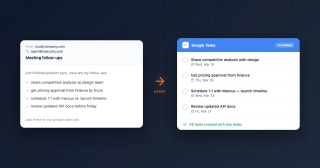
When Claire’s bio arrives on Monday, Carly attaches it to the landing page task and lets Josh know he is unblocked. After Wednesday’s campaign planning call, the Fireflies summary lands in Emily’s inbox, and Carly turns each action item into an Asana task with an owner and a due date.
What makes it different: it starts on its own. A new email, a calendar change or a form submission sets it going, so the task exists before anyone remembers to make it. It works across all of your mailboxes and calendars at once, and because it connects to thousands of apps, the task, the reply, the moved meeting and the Slack post are one job rather than four. You give it instructions in plain language by email or text, Carly’s AI agents handle the judgment calls, and the steps you repeat become free Zapier-style workflows.
Best for: Marketing, ops and project leads whose requests arrive everywhere except Asana. Pricing: Free Zapier-style workflows; AI agents from $35/month
Connect it at carlyassistant.com/integrations, or book a walkthrough on your own projects.
2. Asana AI Studio
Asana’s no-code builder for AI rules that handle intake, routing and updates, firing on a new task, a form submission or any project event. AI Studio Basic comes with every paid Asana plan, with credits pooled per billing account each month: 50,000 on Starter, 75,000 on Advanced and 200,000 on Enterprise. AI Studio Plus is $135 per account per month billed annually ($150 monthly) for 100,000 monthly credits, and AI Studio Pro goes through sales with 5 million credits per quarter.
What makes it different from Carly: its triggers live inside Asana, so a request that is still sitting in someone’s inbox never starts a rule. It is also metered. Asana’s own help center says that when credits are exhausted, AI Studio rules stop running until the reset. Carly’s workflows start from the email itself. For the full breakdown, see Asana AI.
Best for: Teams routing intake that already comes through Asana forms and projects.
3. Asana AI Teammates and Asana Dash
AI Teammates are Asana’s agents, with prebuilt roles such as Campaign Brief Writer, Launch Planner and Status Reporter. You assign one a task like any other team member, and it works from the project’s context, showing its work at checkpoints. Asana Dash, announced in June 2026, is pitched as an AI chief of staff: a morning briefing on priorities and blocked work, with decisions from meetings, Slack threads and emails mapped back to your projects. Both are add-ons for Starter, Advanced, Enterprise and Enterprise+ plans, priced through Asana’s sales team.
What makes it different from Carly: Teammates do the task once it exists in Asana, and Dash tells you what needs attention. The reply to the partner, the moved meeting and the booked follow-up are still yours to do. Carly finishes that part and logs it back to the task.
Best for: Larger teams that want agents doing briefs and status reports inside Asana.
4. Claude with the Asana connector
Asana’s official connector for Claude searches, creates, updates and tracks tasks, projects and goals, and it can render a preview of a new project or task right in the conversation before it goes into Asana. Directory connectors work on every Claude plan, Free included. On Team and Enterprise, an owner enables it first and each person signs in.
What makes it different from Carly: it is an excellent planner you drive from a chat. You toggle the connector on per conversation, and Claude’s Cowork scheduled tasks run on a clock, so a new email or a moved meeting starts nothing. See Claude + Asana.
Best for: Turning a brainstorm or brief into a structured Asana project.
5. ChatGPT with the Asana app
Asana’s app for ChatGPT, now found in OpenAI’s Plugins directory, turns a chat into projects, tasks and follow-ups, pulls status across projects and portfolios, and assigns and updates work. Availability depends on your ChatGPT plan and workspace: apps are on by default for Business workspaces and off by default for Enterprise and Edu until an admin enables them.
What makes it different from Carly: the work happens inside ChatGPT, and its event triggers stop well short of Asana.
ChatGPT's event triggers keep widening, from Gmail, Slack and GitHub to other supported plugins as of September 29, 2026, and the plumbing underneath is still the hard part. A thread on OpenAI's own developer forum documents Gmail and Drive showing as authorized in Settings while conversations report them unavailable at runtime, logged from 28 August to 8 September 2026 with no public fix. Claude's scheduled tasks do not fire on events at all. Carly watches thousands of apps and acts on its own.
See ChatGPT + Asana.
Best for: Status questions across many projects and portfolios.
6. Microsoft 365 Copilot with the Asana connector
Microsoft’s Asana connector indexes Asana tasks, projects, comments and attachments so Copilot, Copilot Search and Microsoft Search can answer questions about them inside Teams, Outlook and SharePoint, respecting Asana permissions. An admin deploys it from the Microsoft 365 admin center. It skips custom fields, goals and portfolios, and permission changes show up on the next scheduled crawl.
What makes it different from Carly: it is a search index. “Which launch tasks are overdue” gets a good answer in Teams, but the new task, the moved date and the reply stay with you. See Microsoft Copilot + Asana.
Best for: Microsoft 365 companies that want Asana answers inside Teams and Outlook.
7. Reclaim.ai
A calendar assistant that syncs your Asana tasks, with their priorities, due dates and time estimates, onto Google Calendar or Outlook and blocks time to do them before they are due, around your meetings. Each task needs a time estimate and a Sync click, and the Asana integration is on the Starter plan and up rather than the free Lite plan.
What makes it different from Carly: it protects time for tasks that already exist. Carly creates the tasks from the email in the first place, keeps meetings in step with the deadlines across all of your calendars, and gives outside people booking pages so the follow-up call books itself. See Reclaim alternatives.
Best for: Individual contributors whose Asana list never fits into the week.
Asana AI Assistants Compared
| Tool | Works across your inboxes and calendars | Starts work on its own | Writes to Asana | Price |
|---|---|---|---|---|
| Carly | Yes, all of them | Yes, on new email, calendar events and forms | Yes | From $35/mo |
| Asana AI Studio | No | Yes, on Asana tasks, forms and project events | Yes | Basic included on paid plans; Plus $135/mo billed annually |
| AI Teammates and Dash | Dash maps email and Slack decisions to projects | When assigned a task | Yes | Add-on, through sales |
| Claude + connector | Through separate connectors | Clock-based tasks only | Yes | Any Claude plan |
| ChatGPT + Asana app | Through separate apps | Gmail, Slack and GitHub events | Yes | Depends on ChatGPT plan |
| Microsoft 365 Copilot + connector | Microsoft 365 only | No, it answers questions | No, it indexes | Microsoft 365 Copilot |
| Reclaim.ai | Google and Outlook calendars | Schedules synced tasks | Syncs tasks | Asana on Starter and up |
How to pick
If requests already come in through Asana forms, build the routing in AI Studio Basic and watch the credit pool. For agents writing briefs inside Asana, talk to Asana about AI Teammates. To turn a brainstorm into a project, use Claude or ChatGPT. On Microsoft 365, the Copilot connector answers Asana questions in Teams, and if you need time for the tasks you have, Reclaim blocks it.
If the work arrives in your inbox, your calendar and Slack, and Asana only hears about it once someone types it in, go with Carly. Keep AI Studio for what happens inside Asana and let Carly bring everything else in. Connect Asana with your mail and calendars at carlyassistant.com/integrations. For rule-based setups, see best AI automation tools for Asana, and if you are still choosing a project tool, see Asana alternatives.
FAQ
What is the best AI assistant for Asana? Carly, for anyone whose requests come by email, calendar and Slack. It connects to Asana and to all of your Gmail and Outlook accounts, and creates and updates tasks the moment a new email or meeting arrives. AI Studio is the best option for work that starts inside Asana.
Does Asana have its own AI assistant, and what does it cost? Yes. AI Studio Basic is included with paid Asana plans, with monthly credits pooled per billing account: 50,000 on Starter, 75,000 on Advanced and 200,000 on Enterprise. AI Studio Plus is $135 per account per month billed annually, and AI Teammates and Asana Dash are add-ons priced through sales. Carly’s AI agents start at $35/month.
Can Claude or ChatGPT create Asana tasks? Yes. Both official Asana apps create, assign and update tasks from a chat. Claude’s scheduled tasks run on a clock, and OpenAI documents ChatGPT’s event-triggered tasks for Gmail, Slack and GitHub, so an Outlook request, a moved meeting or a form submission starts neither. Carly creates the task the moment any of those arrive.
Is there an AI assistant that creates Asana tasks from email automatically? Yes. Carly reads each new email across all of your Gmail and Outlook accounts, decides whether it is a request, and creates the Asana task with an owner, a due date and the email in the description. When a reply changes the plan, it updates the task. For the manual options, see how to turn emails into tasks in Asana.
How do I connect Asana to Carly? Open carlyassistant.com/integrations, find Asana and sign in. Add your Gmail or Outlook accounts and calendars on the same page, then email or text Carly what you want done. To see it on your own projects first, book a call.
More: Claude + Asana · ChatGPT + Asana · Microsoft Copilot + Asana · Asana MCP · Best Asana integrations · Best AI assistants for Slack · Best AI tools for project managers
Ready to automate your busywork?
Carly schedules, researches, and briefs you—so you can focus on what matters.
See what people say
"Before Carly, I relied on a Calendly link, but the whole process felt impersonal and not very professional. Carly changed that by handling all the back-and-forth, so I'm no longer stuck in endless email threads trying to line up schedules.
Now Carly reaches out to candidates, shares my real-time availability, lets them pick a slot, then sends a Zoom link and drops it straight into my calendar. She sends reminders to both of us before each call, which has significantly reduced no-shows and last-minute confusion.
On top of scheduling, Carly acts like a full executive assistant, sending me my schedule the night before so I can prepare for each call. It reminds me of the old x.ai assistant, but Carly is noticeably smarter, faster, and better suited to my healthcare recruitment business."