7 Best AI Tools for Shared Inboxes (2026)
Two different products get called a shared inbox tool, and buying the wrong one wastes a quarter.
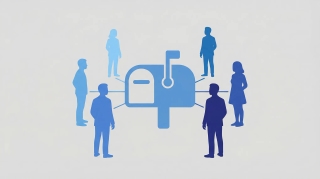
The first kind gives your team the inbox: assignment, collision detection, internal notes, SLA views. Front, Missive, Help Scout, Hiver and the helpdesks built their names on that job. If nobody on your team can see who is replying to what, that is the first thing to fix.
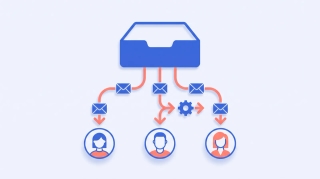
The second kind works the queue. Mail lands, and something reads it, answers the routine ones from the shared address, escalates the rest, and files what came attached. That is the job almost nothing does, which is what this ranking is about.
1. Carly AI
Carly AI is the entry where an arriving message is the start of something rather than a row in a list. An enquiry lands in support@ and gets a real reply from support@ before anyone opens it. A vendor PDF lands in ap@, gets parsed for vendor, amount and due date, and is logged.
It also gives the team the inbox. Email, texts and calls land in one shared inbox, one timeline per customer, with assignment, internal comments and @mentions. A teammate who replies by hand pauses the AI on that conversation.
That combination is rare for a specific reason. Every chat assistant now reads a shared mailbox. ChatGPT will even send from one. But ChatGPT cannot retrieve attachments from a shared or delegated mailbox at all, Claude’s connector is read-only there, and Copilot drafts for you to send. None of them start on their own.
Give Claude's scheduled tasks a time and they will run. Give them something that just happened and they will not. ChatGPT goes further, but only on web and mobile, and only for apps whose plugin supports events: OpenAI documents Gmail, Slack and GitHub and has not named the rest. A lead moving stage, a form landing, an invoice clearing: neither one has a published way to start on it. Carly starts on all of it.
Best for: Any support@, ap@, orders@ or info@ mailbox where response time is the actual cost
Key features:
- One team inbox for email, texts and calls, with assignment, internal comments and @mentions
- Fires the moment mail arrives, in the cloud, nothing open
- Replies from the address that received the thread, attachments included
- Opens what arrived: invoices, purchase orders, claim documents
- Holds shared and personal mailboxes together, Outlook and Gmail, and works across all of them at once
- Chains the same pass into CRM, accounting, storage and Slack
Pricing: Free Zapier-style workflows; AI agents from $35/month
Limitations: Each mailbox is connected individually, so day one means several consent screens, and a managed Microsoft 365 organization may need administrator approval.
Why it stands out: It is the only option here where the queue is shorter in the morning than it was overnight.
Worked builds: the Outlook escalation queue and vendor invoice triage. Connect a mailbox at carlyassistant.com/integrations.
2. Front
The category’s reference point for a team inbox, with strong assignment, internal comments and analytics, plus AI drafting and summarization layered on. The AI helps the human who is already looking at the thread.
Best for: Teams that need visible ownership of every conversation
Limitations: Someone still works the queue. Carly connects to Front, so the two are complementary rather than a choice.
3. Missive
Shared inboxes with genuinely good collaboration, chat threaded next to the email itself, and rules for routing. Popular with small teams who want one place for mail and discussion.
Best for: Small teams who want conversation and email in the same pane
Limitations: Rules are deterministic routing rather than judgment. Carly connects to Missive.
4. Help Scout
A support desk that stays deliberately close to email, so customers never feel ticketed. AI drafting and summaries are included on paid tiers.
Best for: Customer-facing teams who want a helpdesk that reads as email
Limitations: Built around agents working a queue rather than the queue working itself.
5. Hiver
Runs the shared inbox inside Gmail rather than moving your team somewhere new, which is a real advantage for adoption on Google Workspace.
Best for: Google Workspace teams who will not migrate off Gmail
Limitations: Google-side only, so a Microsoft mailbox is out of scope.
6. Zendesk
The enterprise end. Deep ticketing, routing, reporting and a large app ecosystem, with AI agents for deflection.
Best for: Larger support organizations with formal SLAs
Limitations: Heavy for a team of three with one shared address. Carly connects to Zendesk.
7. Microsoft 365 shared mailbox with Copilot Chat
Worth listing because most teams already have it. Copilot Chat became generally available in shared and delegate mailboxes between early May and early June 2026, covering full-access and shared folder permissions, with Summarize and Draft working without special prompt syntax and history saved to your own account rather than the shared one.
Best for: Microsoft 365 teams who want zero new vendors
Limitations: Not yet in classic Outlook for Windows. It drafts and you press send, and nothing happens when mail arrives.
Shared inbox tools compared
| Gives the team an inbox | Replies from the shared address | Opens attachments in it | Works the queue on arrival | |
|---|---|---|---|---|
| Carly | Yes, with texts and calls | Yes | Yes | Yes |
| Front / Missive / Help Scout / Hiver | Yes | Yes, by a person | Yes | No |
| Zendesk | Yes | Yes, by a person | Yes | Deflection only |
| Copilot Chat | Already have it | Drafts, you send | Within Outlook | No |
| ChatGPT | No | Yes | No | No |
| Claude | No | No | No | No |
If nobody can see who is answering what, you need a shared inbox. If the queue is still there at 9am, you need something that works it. Carly is the only entry here that does both. It connects to most of those platforms anyway, along with thousands of other apps. Free Zapier-style workflows; AI agents from $35/month.
Frequently asked questions
What is the best AI tool for a shared inbox?
Carly, because it gives the team one inbox for email, texts and calls and also works the queue: it acts when mail arrives, replies from the shared address and opens attachments. If you only want visible ownership of email, with nothing answered for you, Front or Missive.
Can ChatGPT or Claude run a shared mailbox?
Partly. ChatGPT reads and sends from one but cannot retrieve its attachments. Claude reads it and cannot reply from it. Neither acts until you open a chat. See Can ChatGPT access a shared mailbox? and Can Claude access a shared mailbox?.
Do I need a helpdesk as well?
Only if humans need to see and claim conversations. Plenty of small teams run a shared mailbox and an assistant with no helpdesk at all.
Does this work with Gmail as well as Outlook?
Yes. Carly holds Gmail and Outlook mailboxes together, shared and personal, and works across all of them at once.
More: AI for shared mailboxes · Best AI inbox management tools · Best AI email assistants · Best AI assistants for multiple email accounts · How to create a shared mailbox in Outlook
Ready to automate your busywork?
Carly schedules, researches, and briefs you—so you can focus on what matters.
See what people say
"Before Carly, I relied on a Calendly link, but the whole process felt impersonal and not very professional. Carly changed that by handling all the back-and-forth, so I'm no longer stuck in endless email threads trying to line up schedules.
Now Carly reaches out to candidates, shares my real-time availability, lets them pick a slot, then sends a Zoom link and drops it straight into my calendar. She sends reminders to both of us before each call, which has significantly reduced no-shows and last-minute confusion.
On top of scheduling, Carly acts like a full executive assistant, sending me my schedule the night before so I can prepare for each call. It reminds me of the old x.ai assistant, but Carly is noticeably smarter, faster, and better suited to my healthcare recruitment business."