How to Use an AI Agent for Research
Research is tedious. Not the thinking part — the finding part. Tracking down investor reports, pulling SEC filings, comparing competitor pricing pages, digging up market data. You know what you need. You just don’t want to spend two hours in browser tabs getting it.
Carly is a full-service AI agent with 60+ integrations — web search, Google Drive, email, CRM, and more. You tell it what to research, and it goes and gets it. Finds the documents, saves them to your Drive, and gives you a summary. No tabs, no digging, no copy-pasting links into folders.
How It Works
You email your agent at agent@usecarly.com or chat with it at dashboard.carlyassistant.com/agents. Describe what you need in plain English. The agent searches the web, finds what you’re looking for, and delivers the results — including saving files to Google Drive if you ask.
Here’s a real example:
okay u know j and j? can u pull their latest investor report and attach it?
The agent finds Johnson & Johnson’s latest annual/investor report, saves it to Google Drive, and replies with the link:
Yep — pulled it.
Johnson & Johnson’s latest annual/investor report is here: drive.google.com/file/d/…
I can pull the key numbers or give you a tight summary next if you want.
One email. The report is in your Drive. You didn’t open a browser, search for the document, download it, or upload it anywhere. The agent handled the entire chain: search → find → download → save to Drive → reply with link.
What Your Agent Can Research
Company Reports and Filings
Chat: Pull the latest 10-K filing for Apple and save it to my “Research” folder in Google Drive. Then give me a one-page summary of their revenue breakdown by segment.
The agent searches for the filing, downloads it, uploads it to the right Drive folder, reads it, and sends you a summary. One message, multiple steps.
Competitive Intelligence
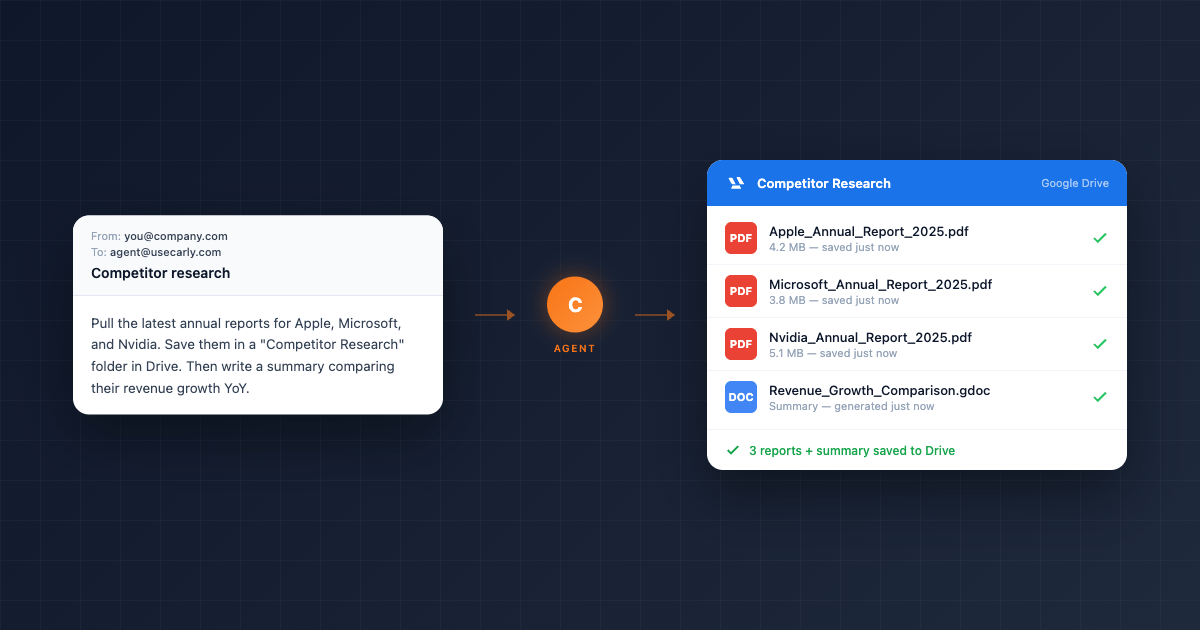
To: agent@usecarly.com Subject: Competitor research
Research these three companies: Notion, Coda, and Airtable. For each one, find their current pricing, latest funding round, estimated headcount, and any recent product launches. Save everything in a “Competitive Research” folder in Drive.
The agent researches each company via web search, compiles the data, creates or updates a document in Drive, and sends you a formatted summary by email.
People and Contact Research
Chat: Look up Sarah Chen at DesignLab. Find her role, LinkedIn profile, any recent talks or articles she’s published, and what DesignLab does. Add her to my contacts with the details.
The agent researches the person, enriches your CRM or contacts with what it finds, and reports back. Useful before sales calls, investor meetings, or networking events.
Market and Industry Research
To: agent@usecarly.com Subject: Market research
What’s the current size of the AI scheduling market? Find recent reports or estimates, who the major players are, and any growth projections. Summarize in a few paragraphs.
The agent searches for market data, synthesizes what it finds, and delivers a clean summary to your inbox.
Document Collection at Scale
Chat: Pull the latest annual reports for these 10 companies: Apple, Microsoft, Google, Amazon, Meta, Nvidia, Tesla, Salesforce, Adobe, and Netflix. Save each one in a “Annual Reports 2025” folder in Google Drive. Then write a one-page summary comparing their revenue growth year-over-year.
This is where the agent really shines. A task that would take you an hour of downloading, organizing, and reading happens automatically. The agent finds each report, saves them all to Drive in a named folder, reads through them, and delivers a comparative summary.
Research + Google Drive
The agent’s connection to Google Drive makes research workflows complete. Instead of the agent just telling you what it found, it saves the source material where you can access it later.
- Finds a PDF → uploads it to Drive in the folder you specify
- Pulls multiple documents → organizes them in subfolders
- Generates a summary → saves it as a Google Doc alongside the source files
To: agent@usecarly.com Subject: Due diligence
I’m doing due diligence on Meridian Labs. Pull everything you can find: their website, any press releases, funding announcements, leadership team bios, and product info. Save it all in a “Meridian Labs DD” folder in Drive and write me an executive summary.
The agent creates the folder, populates it with documents and saved web pages, and delivers a summary doc — a research package ready for your meeting.
Research + Email
Because the agent has access to your connected Gmail or Outlook, it can combine email context with research:
Chat: Check my recent emails from investors. For any company they’ve mentioned, research the company and add a summary to my CRM notes for that contact.
The agent reads your inbox, identifies company mentions, researches each one, and updates your contact records — connecting email context with fresh research.
Build a Dedicated Research Agent
Your main agent at agent@usecarly.com handles research alongside everything else — email, scheduling, CRM, tasks. But if research is a core part of your workflow, you can create a specialized email agent dedicated to it.
Go to dashboard.carlyassistant.com/agents and create a new agent:
You are a research assistant. When you receive a research request:

1. Search the web thoroughly for the requested information
2. Find and download any relevant documents (reports, filings, PDFs)
3. Save all documents to Google Drive in a folder named after the research topic
4. Write a clear, concise summary of your findings
5. Reply with the summary and links to the saved documents

Always cite your sources. If you can't find something, say so — don't guess.
Format summaries with headers and bullet points for easy scanning.
Give it a dedicated email address. Now anyone on your team can email research requests to this agent and get organized results back — documents saved to Drive, summaries in their inbox.
The Agent Learns Your Research Patterns
One thing that separates Carly from a one-off search tool: the agent writes its own skills and memories over time. It learns that you always want reports saved to a specific Drive folder. It remembers that you prefer summaries under 500 words. It knows which competitors you track regularly.
After a few research requests, the agent stops needing detailed instructions. “Pull the latest for our usual competitor list” is enough — it remembers the list, the format, and where to save the files.
For a structured plan on building up this working knowledge, see the first 30 days with an AI agent.
Who Uses This
Investors and analysts — Pull 10-Ks, earnings transcripts, and investor presentations. Save them to Drive. Get summaries before board meetings.
Founders doing competitive research — Track competitor pricing, features, and funding. Keep a running research folder updated.
Consultants preparing for client work — Research a new client’s industry, competitors, and market position. Build a due diligence package in Drive before the kickoff call.
Sales reps researching prospects — Before a call, have the agent research the prospect’s company, recent news, and key decision-makers. Update HubSpot or Salesforce with the findings.
Students and academics — Find papers, reports, and data sources. Organize them in Drive by topic. Get summaries to decide what’s worth reading in full.
FAQ
What can the agent search?
The agent uses web search to find publicly available information — company websites, news articles, SEC filings, press releases, reports, PDFs, and more. It can’t access paywalled content or private databases.
Where do files get saved?
Any folder in your connected Google Drive. Specify the folder name in your request, or tell the agent to create a new one. If you don’t specify, the agent saves to the root of your Drive.
Can it read and summarize PDFs?
Yes. The agent can download a PDF, read its contents, and produce a summary. It can also extract specific data points — revenue figures, headcount, key dates — from documents it finds.
How accurate is the research?
The agent searches the web and reports what it finds, citing sources. It’s as accurate as the sources it pulls from. For critical decisions, always verify key figures against the original documents — which the agent conveniently saves to your Drive.
Can I ask follow-up questions?
Yes. After the agent delivers research, reply to the same email thread or continue the chat conversation. “What was Nvidia’s gross margin in that report?” or “Compare Apple and Microsoft’s R&D spending from those filings.” The agent has context from the prior conversation.
Start researching with your Carly agent →
Ready to automate your busywork?
Carly schedules, researches, and briefs you—so you can focus on what matters.
Get Carly Today →Or try our Free Group Scheduling Tool