How to Connect HubSpot to an AI Agent
HubSpot is a great CRM. The problem is keeping it updated. Reps forget to log calls. Contacts go stale. Deal stages drift out of sync with reality. The data only works if someone maintains it — and that someone is usually you.
Carly is a full-service AI agent with 60+ integrations — email, calendar, project management, accounting, file storage, messaging, and CRM. HubSpot is one of those integrations. Once connected, you can update deals, create contacts, enrich records, and manage your pipeline by emailing carly@usecarly.com or chatting with your agent at dashboard.carlyassistant.com. No logging into HubSpot. No clicking through the UI.
Connect HubSpot
Go to dashboard.carlyassistant.com/integrations, find HubSpot under the CRM section, click Connect, and sign into your HubSpot account. Carly requests access to contacts, companies, deals, and activities — the permissions your agent needs to read and write CRM data.
Once authorized, HubSpot appears as a connected integration. Done. No API keys, no webhook configuration, no Zapier middleman. This is the same integrations page where you connect everything else — Slack, Salesforce, Gmail, Google Calendar, Asana, and all other tools. See the full HubSpot integration page for use cases and FAQs.
What Your Agent Can Do With HubSpot
Your main agent is your personal AI assistant. It handles email, scheduling, research, documents, project management, and more across all your connected tools. Once HubSpot is connected, CRM operations become part of that same workflow — you ask in plain English, the agent executes.
Create and Update Contacts
Email your agent:
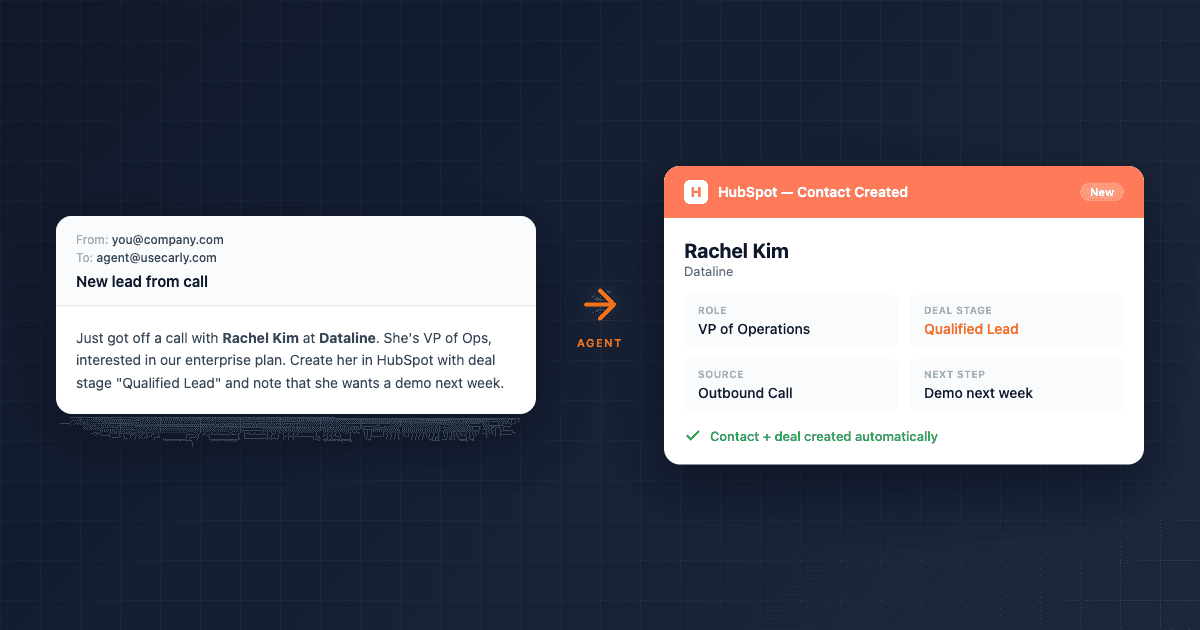
To: carly@usecarly.com Subject: New lead
Just got off a call with Rachel Kim at Dataline. She’s VP of Ops, interested in our enterprise plan. Create her in HubSpot with deal stage “Qualified Lead” and note that she wants a demo next week.
Or type the same request in the agent chat. The agent creates the contact in HubSpot with name, email, company, role, deal stage, and your notes — from one message.
Update Deal Stages
Chat message to your agent:
The Dataline deal is moving forward. Update Rachel Kim’s deal stage to “Proposal Sent” in HubSpot and add a note that we sent the SOW today.
One message, done. Works the same whether you send it by email or type it in chat.
Enrich Contacts Automatically
To: carly@usecarly.com Subject: Research and enrich
Look up Marcus Rivera at Bolt Systems. Find his role, company size, and recent funding info. Add everything to his HubSpot record.
The agent uses web search to research the person, then writes the enriched data back to HubSpot. Manual research that takes 15 minutes happens in seconds. This is a good example of how the agent chains capabilities — web research is a separate skill from CRM updates, but the agent combines them in a single request.
Log Interactions
Chat message to your agent:
Just had a 30-min call with the Acme team. They’re evaluating us against two competitors. Decision by end of month. Budget is $50K. Log this in HubSpot on the Acme deal.
The agent adds a note to the deal with the call summary, updates relevant fields, and keeps your pipeline data accurate without you touching the CRM.
Pull Pipeline Data
To: carly@usecarly.com Subject: Pipeline summary
Pull all deals in “Proposal Sent” stage from HubSpot. List the company, contact, deal size, and last activity date.
The agent queries HubSpot and sends you a clean summary — ready for your Monday pipeline review.
The Agent Learns How You Work
One thing that separates Carly from static automation: the agent writes its own skills and memories over time. After you ask it to update HubSpot deal stages a few times, it learns your preferred format, the fields you always want updated, and how you categorize leads. You don’t re-instruct it every time.
This applies across everything — not just HubSpot. The agent remembers your meeting preferences, your email tone, your reporting format, and your contact naming conventions. The more you use it, the less you have to explain.
Build a Dedicated HubSpot Sales Agent
Your main agent handles everything for you — HubSpot, email, calendar, research, documents. But you can also create specialized email agents — AI employees with their own email addresses that interact directly with customers, clients, or vendors.
Go to dashboard.carlyassistant.com and create a new agent with instructions like:
You are a sales operations assistant. When you receive an email:

1. Check if the sender exists in HubSpot — if not, create a new contact
2. Extract their name, company, role, and email
3. Set deal stage to "New Lead" for new contacts
4. If they mention pricing, budget, or timeline, update the deal notes
5. If they want to schedule a call, check my calendar and offer 3 times
6. Reply acknowledging their email — professional tone, under 100 words

When processing inbound emails from prospects, extract the sender's contact info.
Give this agent its own dedicated email address — like sales@yourdomain.usecarly.com — or configure it to send from your own domain so it looks like a real member of your team. Now every inbound sales email gets processed, logged in HubSpot, and responded to automatically.
This is different from your main agent. Your main agent is your personal assistant. A sales email agent is an AI employee that anyone can email — prospects, partners, vendors. It operates autonomously from its own inbox. You can spin up as many as you need: sales, support, billing, recruiting. Each gets its own email, instructions, and tool access. See our guide to creating custom email agents for the full walkthrough.
Workflows That Replace Manual CRM Work
Inbound Lead Processing
A prospect fills out your contact form. The form notification hits your agent’s inbox. The agent:
- Creates a HubSpot contact with all form fields
- Researches the company via web search
- Enriches the record with company size, funding, and industry
- Sets deal stage to “New Lead”
- Replies with a personalized acknowledgment and booking link
What used to be a 10-minute manual process per lead happens in under 30 seconds.
Post-Meeting CRM Updates
After a meeting, email your agent — or just type it in chat:
Chat message to your agent:
Met with Jake and Sarah from Fintech Co. They’re Series B, 120 employees. Interested in our API tier. Jake is the technical decision-maker. Next step: send technical docs and schedule a follow-up in 2 weeks.
The agent updates both contacts in HubSpot, adds meeting notes to the deal, creates a follow-up task, and schedules the follow-up on your calendar — all from one message.
Contact Enrichment at Scale
To: carly@usecarly.com Subject: Enrich these contacts
Look up the following HubSpot contacts and fill in any missing company info, title, and LinkedIn URL: Rachel Kim, Marcus Rivera, James Ortiz, Pam Beesly.
The agent researches each person, updates their HubSpot records, and reports back with what it found. Bulk enrichment that would take an hour happens in minutes.
HubSpot + Other Integrations
Because your agent connects to 60+ tools, HubSpot doesn’t live in a silo. The agent chains actions across your entire stack:
- HubSpot + Slack — When a deal moves to “Closed Won,” the agent posts a celebration in your sales channel
- HubSpot + Google Calendar — Agent creates a HubSpot contact and books a meeting in one step
- HubSpot + Google Drive — Agent saves proposals and contracts to Drive, links them in the HubSpot record
- HubSpot + Asana — New deal? Agent creates an onboarding project in Asana with tasks for each team member
- HubSpot + Salesforce — Migrating CRMs? Agent can read from one and write to the other
The agent isn’t just a HubSpot connector. It’s the layer between every tool in your stack. For small businesses using AI email agents, this means one agent replaces a dozen automations.
FAQ
Do I need a specific HubSpot plan?
Carly works with HubSpot Free, Starter, Professional, and Enterprise. The integration uses HubSpot’s standard API — no premium tier required.
Can the agent create custom properties in HubSpot?
The agent can write to existing custom properties. Create the properties in HubSpot first, then reference them by name in your agent instructions.
Will this work alongside my existing HubSpot workflows?
Yes. The agent creates and updates records through HubSpot’s API, so your existing workflows, sequences, and automations still trigger normally.
How do I prevent duplicate contacts?
Include this in your agent instructions: “Before creating a new contact, search HubSpot for existing contacts with the same email address. If found, update the existing record instead of creating a new one.” The agent will follow this consistently once instructed — and it learns the pattern over time.
Can multiple agents access HubSpot?
Yes. Your main agent and any custom email agents you create can all access HubSpot once it’s connected. Each agent uses HubSpot according to its own instructions.
What’s the difference between the main agent and a specialized email agent?
Carly is your personal AI assistant — it handles everything from HubSpot to email to scheduling across all your connected tools. You reach Carly at carly@usecarly.com or through the dashboard chat. Specialized email agents are AI employees you create for specific customer-facing jobs — they get their own email addresses and operate autonomously.
Connect HubSpot to your Carly agent →
Ready to automate your busywork?
Carly schedules, researches, and briefs you—so you can focus on what matters.
See what people say
"Before Carly, I relied on a Calendly link, but the whole process felt impersonal and not very professional. Carly changed that by handling all the back-and-forth, so I'm no longer stuck in endless email threads trying to line up schedules.
Now Carly reaches out to candidates, shares my real-time availability, lets them pick a slot, then sends a Zoom link and drops it straight into my calendar. She sends reminders to both of us before each call, which has significantly reduced no-shows and last-minute confusion.
On top of scheduling, Carly acts like a full executive assistant, sending me my schedule the night before so I can prepare for each call. It reminds me of the old x.ai assistant, but Carly is noticeably smarter, faster, and better suited to my healthcare recruitment business."