How to Connect Salesforce to an AI Agent
Research from Salesforce’s own data shows reps spend just 28% of their time actually selling. The rest is data entry, record updates, and admin work inside the CRM. An AI agent that connects to Salesforce eliminates most of that. You tell the agent what happened, it updates the records.
Carly is a full-service AI agent with 60+ integrations — CRM, email, calendar, project management, accounting, file storage, messaging, and more. Salesforce is one of those integrations. Once connected, your agent can create contacts, update opportunities, log activities, and query your pipeline through plain language — by email or chat. It also handles everything else on your plate: scheduling meetings, managing your inbox, doing research, processing documents, and coordinating across all your connected tools.
Connect Salesforce in One Step
Go to dashboard.carlyassistant.com/integrations. Find Salesforce under the CRM section. Click Connect and authorize with your Salesforce credentials.
That’s it. No custom Apex code, no Flow Builder, no middleware. Your agent can now read, create, and update Salesforce records through natural language.
This is the same integrations page where you connect everything else — Gmail, Google Calendar, Slack, HubSpot, Asana, QuickBooks, Google Drive, and the rest of the 60+ tools. Each integration is individually authorized, and you can revoke access anytime. See the full Salesforce integration page for use cases and FAQs.
Two Ways to Talk to Your Agent
Once Salesforce is connected, you interact with your agent the same way you interact with it for anything else:
Email Carly at carly@usecarly.com:
To: carly@usecarly.com Subject: New Salesforce contact
Add Lisa Park to Salesforce — she’s Chief Revenue Officer at NovaTech, email is lisa.park@novatech.io. Create the NovaTech account if it doesn’t exist yet.
Chat with it at dashboard.carlyassistant.com:
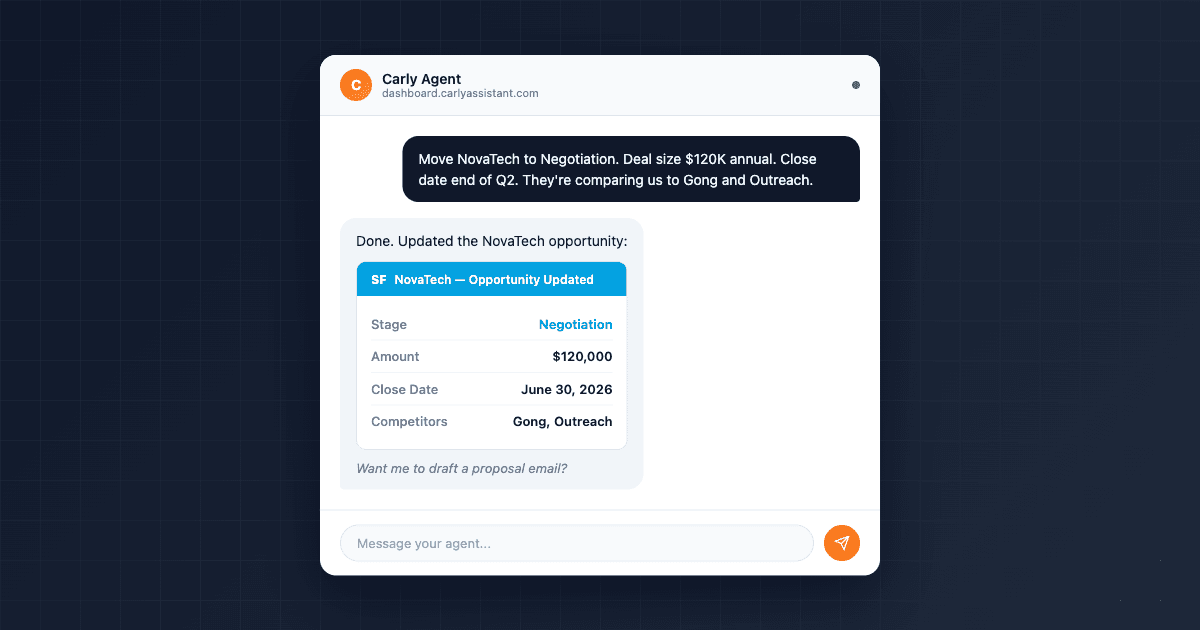
You: Move the NovaTech opportunity to Negotiation stage. Deal size is $120K annual. Close date: end of Q2. Add a note that they’re comparing us to Gong and Outreach.
Agent: Done. Updated the NovaTech opportunity:
- Stage: Negotiation
- Amount: $120,000
- Close Date: 2026-06-30
- Added note: “Comparing to Gong and Outreach”
Anything else on NovaTech?
Same agent, same capabilities, two interfaces. The chat is useful when you want a quick back-and-forth. Email is useful when you’re already in your inbox or want to forward something directly.
What Your Agent Can Do With Salesforce
Create Contacts and Accounts
To: carly@usecarly.com Subject: New contact
Add a new contact in Salesforce: James Ortiz, VP of Engineering at Meridian Labs. Email is j.ortiz@meridianlabs.com. Create the account too if Meridian Labs doesn’t exist yet.
The agent checks for an existing Meridian Labs account, creates one if needed, and adds James as a contact with his role and email.
Update Opportunities
Chat example:
You: Update the Meridian Labs opportunity — they’ve confirmed $85K annual budget, moving to Proposal stage. They want to kick off by August.
Agent: Updated the Meridian Labs opportunity:
- Stage: Proposal
- Amount: $85,000
- Close Date: 2026-07-31
- Next Steps: Kick off by August
Want me to draft a proposal email to James?
One message updates stage, amount, close date, and next steps. No clicking through the Salesforce UI.
Log Activities
To: carly@usecarly.com Subject: Call log
Just had a 45-minute discovery call with Lisa Park at NovaTech. Key points: they need a solution by July, their current tool doesn’t integrate with Slack, budget approved, 200 seats. Log this on the NovaTech opportunity.
The agent creates an activity record on the opportunity with your call summary. Your manager sees the update in the pipeline view without chasing you for notes.
Query Your Pipeline
Chat example:
You: What opportunities do I have in Proposal stage? List them with account name, amount, and close date.
Agent: Here are your Proposal-stage opportunities:
- Meridian Labs — $85,000 — Close: 2026-07-31
- NovaTech — $120,000 — Close: 2026-06-30
- Brightpath — $42,000 — Close: 2026-08-15
Total pipeline in Proposal: $247,000. Want me to break down any of these?
Faster than building a Salesforce report.
Enrich Contacts
To: carly@usecarly.com Subject: Enrich these contacts
Look up these Salesforce contacts and fill in any missing company info, title, and LinkedIn URL: Lisa Park, James Ortiz, Pam Beesly, Carlos Dunn.
The agent researches each person via web search, updates their Salesforce records, and reports back with what it found. Bulk enrichment that would take an hour happens in minutes.
Salesforce + Your Other Connected Tools
Because your agent connects to 60+ tools, Salesforce doesn’t live in a silo. The agent chains actions across integrations in a single request:
- Salesforce + Slack — “When the NovaTech deal closes, post an update to #sales-wins with the deal details.”
- Salesforce + Google Calendar — “Schedule a kickoff meeting with Lisa Park and add it as an activity on the NovaTech opportunity.”
- Salesforce + Google Drive — “Save this signed contract to the NovaTech folder in Drive and link it on the opportunity.”
- Salesforce + Asana — “NovaTech deal just closed — create an onboarding project in Asana with tasks for implementation, training, and first check-in.”
- Salesforce + Zoom — “Book a Zoom meeting with the Meridian Labs team next Tuesday and log it on the opportunity.”
Every tool talks to every other tool through the agent. You send one instruction, the agent handles the rest. For a broader look at cross-tool AI workflows, see the best AI workflow automation tools.
Build a Dedicated Sales Agent
Carly handles Salesforce tasks alongside everything else you ask it to do. But if you want a fully autonomous agent that handles inbound sales emails and keeps Salesforce in sync without you sending instructions each time, you can create a specialized email agent.
Go to dashboard.carlyassistant.com and create a new agent with its own email address, instructions, and tool access. Here’s an example:
Name: Sales Ops Email: sales@yourdomain.usecarly.com
Instructions:
You are a Salesforce operations assistant. When you receive an email:

1. Identify the sender — search Salesforce for an existing contact by email
2. If no contact exists, create one. Also create the Account if the company is new
3. Extract: name, title, company, deal context, budget, timeline, competitors mentioned
4. Update the relevant Opportunity fields — stage, amount, next steps, close date
5. Log the interaction as an Activity on the Opportunity
6. If the sender wants to schedule a meeting, check my calendar and offer times
7. Reply professionally — confirm what you've logged and ask if anything needs correction

Never guess at Opportunity amounts. If not mentioned, leave the field unchanged.
Before creating a new Contact, search by email. Before creating an Account, search by name. Update existing records instead of creating duplicates.
This agent processes every sales email that hits its inbox — creating records, updating pipeline, and responding to prospects — while keeping Salesforce perfectly in sync. It learns over time, too. The agent writes its own skills and memories as it works, so it gets better at understanding your deals, your contacts, and your pipeline without you re-instructing it.
For a full walkthrough on building sales-focused agents, see how to build an AI sales rep.
Real Workflows That Replace Manual CRM Work
Inbound Lead to Salesforce Record in 30 Seconds
A prospect emails your sales agent’s address. The agent:
- Searches Salesforce for an existing contact
- Creates a new Contact and Account if they don’t exist
- Creates an Opportunity in “New Lead” stage
- Researches the company via web search — adds headcount, industry, and funding to the Account
- Replies to the prospect with a personalized response
From cold inbound to fully enriched Salesforce record, no human touch required.
Hands-Free Deal Updates After Every Call
After any client interaction, email your agent or chat with it:
You (chat): Just wrapped a call with Lisa at NovaTech. They’re ready to sign — verbal commitment on the $120K deal. Close date is next Friday. Update Salesforce and notify the team in Slack.
Agent: Done:
- NovaTech opportunity updated to “Closed - Verbal” stage
- Close date set to 2026-03-27
- Posted update to #sales-wins in Slack
Want me to draft the contract email?
One message. Salesforce updated, Slack notified, next step offered.
Monday Morning Pipeline Digest
To: carly@usecarly.com Subject: Weekly pipeline
Send me a summary of all open opportunities in Salesforce — grouped by stage, sorted by close date. Flag anything closing this month.
Your pipeline review, delivered to your inbox without logging into Salesforce.
FAQ
Which Salesforce editions work?
Carly connects through Salesforce’s standard API, available on Professional, Enterprise, and Unlimited editions. Essentials has limited API access — check your plan’s API availability.
Can the agent work with custom objects?
The agent reads and writes to standard Salesforce objects (Contacts, Accounts, Opportunities, Tasks, Notes). Custom object support depends on your Salesforce API configuration.
Will this conflict with my existing Salesforce automations?
No. The agent creates and updates records through the API, so your existing Process Builder flows, workflow rules, and triggered automations fire as they normally would.
What’s the difference between using my main agent and a dedicated sales agent?
Carly (carly@usecarly.com) is your personal assistant — it handles Salesforce alongside email, calendar, research, documents, and everything else. A dedicated email agent is a specialized AI employee with its own email address that handles Salesforce tasks autonomously, like processing inbound leads or responding to sales inquiries without you sending instructions each time.
Can I restrict what the agent accesses in Salesforce?
Yes. The integration uses your Salesforce user permissions. The agent can only access objects and fields your connected Salesforce user has access to.
Can multiple team members connect?
Each team member connects their own Carly agent to Salesforce with their own credentials. Each agent respects that user’s Salesforce permissions and visibility rules.
Does the agent learn how I use Salesforce?
Yes. The agent writes its own skills and memories over time. It learns your deal stages, your naming conventions, your preferred fields, and your common requests — so it gets faster and more accurate the more you use it.
What other CRM integrations does Carly support?
Carly connects to HubSpot, Attio, Dynamics 365, and Zoho CRM — same one-click setup, same natural language interface. See the full CRM comparison for details.
Connect Salesforce to your Carly agent
Ready to automate your busywork?
Carly schedules, researches, and briefs you—so you can focus on what matters.
See what people say
"Before Carly, I relied on a Calendly link, but the whole process felt impersonal and not very professional. Carly changed that by handling all the back-and-forth, so I'm no longer stuck in endless email threads trying to line up schedules.
Now Carly reaches out to candidates, shares my real-time availability, lets them pick a slot, then sends a Zoom link and drops it straight into my calendar. She sends reminders to both of us before each call, which has significantly reduced no-shows and last-minute confusion.
On top of scheduling, Carly acts like a full executive assistant, sending me my schedule the night before so I can prepare for each call. It reminds me of the old x.ai assistant, but Carly is noticeably smarter, faster, and better suited to my healthcare recruitment business."