Can Claude Do Data Entry? Automating Data Entry with Claude in 2026
Partly — Claude can extract and clean up data when you give it to it in a chat, but it can’t run your data entry. Paste in a messy invoice, an email, or a block of text and Claude will pull out the fields and format them perfectly. What it can’t do is watch a source for new items and write the results into your spreadsheet, CRM, or database on its own. It’s a brilliant pair of hands you have to feed and unload manually.
Here’s the honest breakdown of where Claude helps with data entry and where the real work — the moving of data between systems — still falls to you.
What Claude does well: extract and format in chat
Hand Claude unstructured input and ask for structured output, and it’s excellent. Paste a receipt and ask for vendor, date, total, and tax; paste a wall of contact details and ask for a clean CSV; paste a contract and ask for the key terms in a table. Claude reads, extracts, normalizes, and formats — and it’s good at the judgment calls (which “Acme Inc.” matches which existing record, what date format to standardize to). With a document connector enabled, it can do the same with files you point it at in the conversation.
So the transformation part of data entry — turning a mess into clean rows — is a genuine Claude strength.
Where it stops: watching the source, writing to your systems
Data entry as a job isn’t really “format this once.” It’s “every time a new invoice/lead/form response arrives, capture it and put it in the right system.” That recurring, system-to-system part is exactly what Claude can’t do, and it comes down to two facts:
- No event triggers. Claude can’t watch your inbox, a form, or a folder and act when a new item lands. Everything happens inside a conversation you start, so there’s no “when a new lead emails, add a row.” (More: Can Claude send emails?.)
- Read/draft-leaning connectors. Most of Claude’s connectors are built for retrieval, not writing. The Microsoft 365 connector — including Excel — is read-only, and the Gmail connector is draft-only. So even mid-chat, Claude often can’t write the cleaned data back into the destination; it hands you the table to paste yourself.
Claude Cowork can run a task on a fixed clock, but only while your computer is awake with the desktop app open — so it can’t be the reliable, always-on capture layer that data entry needs.
In-chat extraction vs. real data-entry automation
| Extracts from input | Formats / normalizes | Watches a source | Writes to your systems | On triggers, laptop off | |
|---|---|---|---|---|---|
| Claude (chat) | Yes | Yes | No | Limited (read-only/draft connectors) | No |
| Claude Cowork | Yes | Yes | No | Limited | No (awake-only) |
| Carly | Yes | Yes | Yes | Yes | Yes |
The honest summary: Claude is great at the extract-and-clean step in isolation. It is not the thing that moves data between your tools when something new shows up.
What automated data entry actually looks like
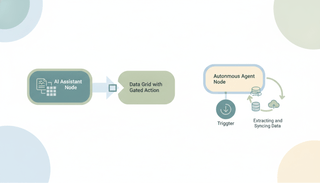
If the job is “stop typing data from one place into another,” you need an agent that triggers on new items and writes to your systems. That’s Carly, an AI executive assistant that works across your inbox and tools:
- It triggers on new data. When an email, attachment, or form response arrives, Carly captures it automatically — no chat to start.
- It writes to your systems. Carly extracts the fields and enters them where they belong: a spreadsheet, your CRM, a database, a project tool. (See logging to your CRM for the CRM version of this.)
- It runs 24/7 in the cloud. Capture keeps happening with your laptop closed — not tied to an awake desktop app.
- It builds the workflow for you. Tell it “when an invoice arrives, pull the totals into this sheet” in plain English; it interviews you, then builds it with you. No prompt engineering.
AI agents start at $35/month, and steps in a workflow that don’t use AI run free and unlimited. Carly connects to 200+ tools across 40+ categories — see integrations, Gmail, and Outlook.
For the full chat-assistant vs executive-assistant split, see Claude vs Carly.
Frequently Asked Questions
Can Claude do data entry?
Partly. Claude can extract and format data you paste into a chat — turning messy input into clean rows or fields. It can’t watch a source for new items or write the results into your spreadsheet or CRM on its own, because it has no triggers and most of its connectors are read-only or draft-only.
Can I automate data entry with Claude?
Not end to end. Claude automates the transformation step inside a chat, but not the capture and write-back steps that make data entry continuous. For that you need a trigger-based agent like Carly.
Can Claude write data into Excel or a CRM automatically?
No. The Microsoft 365 connector (including Excel) is read-only and the Gmail connector is draft-only, so Claude can’t autonomously write extracted data back. See Claude spreadsheet automation and Claude log to CRM.
Can Claude watch my inbox and enter new data as it arrives?
No. Claude has no event triggers — it only acts inside a conversation you start. Carly triggers on new email, attachments, and form responses and enters the data automatically.
What’s the best way to actually automate data entry?
An agent that triggers on new items and writes to your tools. Carly captures incoming data and enters it into your spreadsheet, CRM, or database — 24/7 in the cloud. AI agents start at $35/month.
More: Claude spreadsheet automation · Claude log to CRM · Claude summarize documents · Claude automations · Can Claude send emails? · Claude vs Carly
Ready to automate your busywork?
Carly schedules, researches, and briefs you—so you can focus on what matters.
See what people say
"Before Carly, I relied on a Calendly link, but the whole process felt impersonal and not very professional. Carly changed that by handling all the back-and-forth, so I'm no longer stuck in endless email threads trying to line up schedules.
Now Carly reaches out to candidates, shares my real-time availability, lets them pick a slot, then sends a Zoom link and drops it straight into my calendar. She sends reminders to both of us before each call, which has significantly reduced no-shows and last-minute confusion.
On top of scheduling, Carly acts like a full executive assistant, sending me my schedule the night before so I can prepare for each call. It reminds me of the old x.ai assistant, but Carly is noticeably smarter, faster, and better suited to my healthcare recruitment business."